Category: Thoughts & Theory

Explore the foundational ideas, history, and concepts behind web development. From defining HTML to understanding imposter syndrome — thoughtful takes and web theory live here

  • Javascript Testing Tools Explained: What Beginners Really Need To Know

    If you just learned what testing is and you’re still a bit unsure how to start, you’re not alone. Many beginner developers feel overwhelmed by the amount of tools and libraries in the Javascript testing world. You might wonder: do I need Jest? What is Vitest? Why does everyone keep talking about mocking things?

    Let me help you make sense of it all.

    This post builds on the one you (hopefully) already read: Javascript testing for beginners: A simple, practical introduction. If not, it’s a good starting point to understand why testing matters in the first place. Here, we’ll talk about what tools are out there, why they exist, and how to choose the right one for your project.

    Why so many testing tools?

    The short answer is: because testing needs can be very different. Some developers need to test just one small function. Others need to simulate how a user clicks buttons on a real webpage. Some need to test backend logic or APIs. And some want all of that together.

    Different tools are created to solve different testing problems. Let’s look at the main ones you’ll hear about.

    What is a testing framework?

    Before going further, let’s clear something up. When people say “testing framework” or “testing library,” they sometimes mix up terms. In this post, we’ll use them loosely. Don’t worry too much about definitions.

    But just so we’re on the same page:

    • A testing framework usually provides the structure: how to describe a test, run it, and report results.
    • A testing library might focus on one specific part of the testing process (like simulating user actions or helping with mocking).

    Now let’s see what each popular tool actually does.

    Jest: The default for many projects

    Jest is probably the first tool you’ll hear about in Javascript testing. It’s widely used, especially in React projects. And for good reason—it comes with most things you need built in: test runner, assertion library, and mocking tools.

    • You can write simple tests using test() and expect().
    • You can mock functions easily (see what a mock is if you’re unsure).
    • It works out of the box with many setups.

    A basic test in Jest looks like this:

    import { sum } from './math';
    
    test('adds two numbers', () => {
      expect(sum(2, 3)).toBe(5);
    });
    JavaScript

    Jest is great for unit tests, which are explained more deeply in Integration and unit tests: How to choose the right one?. But it also supports more advanced setups.

    Still, Jest isn’t perfect for every case.

    Vitest: Fast and Vite-Friendly

    If you’re using Vite, you might prefer Vitest. It’s a newer test runner that works very similarly to Jest but is built for speed and modern dev setups.

    It supports:

    • ES modules by default
    • Fast startup thanks to Vite integration
    • Very similar API to Jest, so switching isn’t too hard

    If you’re just starting and you already use Vite for your project, Vitest is a great alternative. It feels lighter and quicker, especially for frontend apps.

    Testing Library (RTL): For testing UI like a real user

    React Testing Library (often called RTL) is a library for testing user interfaces. It doesn’t replace Jest—it works with Jest.

    RTL helps you simulate how users actually interact with your app:

    • Clicking buttons
    • Typing in inputs
    • Checking if the right text shows up

    Instead of testing if a certain component method was called, you test what the user sees. This makes your tests more realistic.

    It follows a rule: “The more your tests resemble the way your software is used, the more confidence they can give you.”

    Mocha, Chai, Sinon: The Classic Trio

    Before Jest became popular, many Javascript projects used this combo:

    • Mocha for running tests
    • Chai for writing assertions
    • Sinon for creating mocks and spies

    These tools are still good and used in some backend or legacy projects. They give you more flexibility, but also more setup.

    For example, to run tests with Mocha and Chai, you’ll usually need to install them separately and configure them more manually.

    If you’re just starting, you don’t need to go this route unless you’re joining a project that already uses them.

    What about Mocks, Spies, and Stubs?

    You’ll hear these words a lot when testing. Here’s what they mean in simple terms:

    • A mock is a fake function that replaces a real one during testing. It lets you test what happens without calling the real thing.
    • A spy is a function that records if and how it was called, but still lets the real function run.
    • A stub is like a mock but with more control—you can decide what it returns.

    If you’re confused, check the glossary entries for mock and spy.

    These tools are helpful in unit testing, when you want to isolate just one part of your code. For example, you might want to check that a function called another one, but without actually doing what the second one does.

    What should you use as a beginner?

    Here’s a simple suggestion:

    • Start with Jest. It’s well-documented, easy to set up, and covers most use cases.
    • If you’re using Vite, try Vitest instead.
    • If you’re building user interfaces, add Testing Library to test what the user sees.

    You don’t need everything at once. Focus on learning how to write a few tests. You’ll naturally learn the tools better as you write more code.

    A quick example: Putting it together

    Let’s say you have a small function like this:

    export function greetUser(name) {
      return `Hello, ${name}!`;
    }
    JavaScript

    A simple unit test using Vitest would be:

    import { describe, it, expect } from 'vitest';
    import { greetUser } from './greet';
    
    describe('greetUser', () => {
      it('greets by name', () => {
        expect(greetUser('Anna')).toBe('Hello, Anna!');
      });
    });
    JavaScript

    You could use Jest instead—the code would almost be the same. This test checks the return value, no mocking needed.

    Later, if your function becomes more complex (calls an API, uses another function), you might use a mock to isolate the behavior. You can then write more detailed tests, like we discuss in Integration and unit tests: How to choose the right one?.

    Final thoughts

    Don’t feel like you need to master every testing tool at once. Testing is a skill you build slowly. Start small, use a simple tool like Jest or Vitest, and practice writing real tests.

    If you’re ever stuck on what kind of test to write, go back to Javascript testing for beginners and Integration and unit tests: How to choose the right one? to refresh the theory.

    The tools are just tools—they’re here to help you write better, safer code. And soon, you’ll start to feel that they do.  🥳

  • Javascript Testing for Beginners: A Simple, Practical Introduction

    Learning Javascript often feels clear at the beginning. You write some code, refresh the browser, and see something working on the screen. That feedback is immediate and encouraging. But as soon as your code grows beyond a few files or functions, things start to feel less predictable.

    You change a small piece of logic, and something unrelated breaks. You fix that, and another issue appears somewhere else. At that point, many beginners feel stuck. They know something is wrong, but they don’t have a reliable way to understand what changed or why.

    This is where testing becomes useful.

    Javascript testing is not about writing perfect code or preventing every bug. Especially for beginners, testing is about building confidence and clarity. It gives you a way to check that your code behaves the way you think it does, and it gives you fast feedback when that behavior changes.

    This guide introduces Javascript testing in a practical, beginner-friendly way. It focuses on understanding the ideas first, without pushing tools or complexity before they make sense.

    What is Javascript testing?

    Javascript testing is the practice of writing code that checks other code.

    A test runs part of your Javascript program and verifies that the result matches what you expect. If the result is correct, the test passes. If it’s not, the test fails and shows you that something is wrong.

    Most tests are built around veassery simple expectations. You might expect a function to return a specific value, handle invalid input gracefully, or behave consistently when called multiple times. Testing gives you a repeatable way to verify those expectations instead of relying on manual checks.

    Testing is part of a broader idea known as software testing, which exists across all programming languages. Javascript testing applies the same principles to Javascript code, whether it runs in the browser, on a server, or inside a larger application.

    The key benefit of testing is not automation alone. It’s trust. When you have tests, you don’t have to wonder whether something still works. You can check.

    Why Javascript testing matters for beginners

    Many beginners believe testing is something you add later, once you are “good enough” at Javascript. In reality, testing is often most helpful when you are still learning.

    When you write tests, you are forced to be precise about what your code should do. That process often exposes misunderstandings early. A test might fail not because your code is broken, but because your assumption about how something works was incorrect.

    Without tests, debugging tends to rely on trial and error. You log values, refresh the page, and hope you notice what went wrong. With tests, failures give you direct signals. They tell you that something changed and help narrow down where the problem lives.

    Testing also makes change safer. Beginners often avoid refactoring because they’re afraid of breaking something they already fixed. Tests reduce that fear by giving you quick feedback when behavior changes.

    How Javascript testing works at a basic level

    At a basic level, Javascript testing follows a simple pattern.

    You provide some input, run the code you want to test, and then check the result. That final check is done using something called an assertion. An assertion compares what actually happened with what you expected to happen and decides whether the test should pass or fail.

    To make this more concrete, here’s a very small example using Jest.

    Imagine you have a simple function that adds two numbers:

    export const add = (a, b) => {
      return a + b;
    };
    JavaScript

    Now you want to test that this function works as expected. A basic Jest test might look like this:

    import { add } from './add';
    
    test('adds two numbers correctly', () => {
      expect(add(2, 3)).toBe(5);
    });
    JavaScript

    In this example:

    • test defines a test case
    • add(2, 3) runs the code being tested
    • expect(add(2, 3)).toBe(5) is the assertion

    The assertion checks whether the actual result matches the expected result. If add(2, 3) returns 5, the test passes. If it returns anything else, the test fails.

    You don’t need to understand every detail of the syntax right away. What matters is the idea: tests describe expected behavior and automatically verify it.

    Types of Javascript testing you should be aware of

    Javascript testing includes different approaches, but beginners don’t need to use all of them immediately.

    The most common starting point is unit testing. Unit tests focus on small, isolated pieces of code, usually individual functions. They are fast to run, easy to understand, and easier to debug when something goes wrong.

    Other testing types exist, such as integration testing and end-to-end testing. These focus on how different parts of an application work together or how the entire application behaves from a user’s perspective.

    One common question beginners ask is whether to focus on unit tests or integration tests first, and how to choose between them.

    As a beginner, it’s enough to understand that these testing types exist and serve different purposes. You can explore them gradually as your projects grow in size and complexity.

    Javascript testing tools and why they exist

    To run tests, you need a testing tool. A Javascript testing tool provides a way to execute your tests, make assertions, and show clear feedback when something fails.

    At a basic level, testing tools take care of the repetitive work. They find your test files, run them, and report which tests passed or failed. This lets you focus on writing and understanding tests instead of building your own testing system from scratch.

    Different tools exist because they solve slightly different problems.

    Some tools, like Jest and Vitest, are all-in-one solutions. They include a test runner, an assertion system, and helpful features like watching for file changes. These tools are often a good starting point for beginners because everything works together out of the box.

    Other tools focus on specific parts of the testing process. For example, Chai is an assertion library that helps you express expectations clearly, while Sinon is commonly used for creating mocks and spies when you need more control over how code behaves during tests.

    In frontend-focused projects, especially those using frameworks like React, you may also encounter React Testing Library (RTL). Its goal is to help you test components in a way that reflects how real users interact with them, rather than testing internal implementation details.

    It’s important to understand that you don’t need all of these tools at once. Many beginners start with a single, integrated tool and add others only when a specific need appears. The concepts behind testing matter far more than the number of libraries you use.

    Testing tools exist to support learning and confidence. They should make testing feel easier, not heavier.

    Not sure what tool to start with? I broke down the main ones like Jest and Vitest in a separate post: Javascript Testing Tools Explained, so you can pick without the overwhelm.

    How testing changes the way you write Javascript

    Over time, testing influences how you approach writing code.

    When you write tests, you naturally start thinking in terms of inputs and outputs. You tend to write smaller, clearer functions because they are easier to test. This leads to code that is easier to read, reason about, and maintain.

    Tests also act as a form of documentation. They show how your code is expected to behave in real situations, which is helpful when you return to a project later or share it with others.

    Some developers take this further by writing tests before writing code, a practice often called test-driven development. You don’t need to follow this approach strictly, but understanding it helps put testing into a professional context.

    Common beginner worries about testing

    It’s normal to feel unsure when starting with testing. Many beginners worry about writing tests the wrong way or not testing enough.

    The truth is that imperfect tests are still useful. Testing is a skill that improves with repetition. Early tests may feel awkward, but they still provide feedback and build understanding.

    Avoiding testing because it feels unfamiliar only delays that learning. Progress matters more than getting everything right.

    Final thoughts

    You don’t need a large project to begin testing. One function is enough.

    Write a test. Let it fail. Fix the code. Run the test again and see it pass. That small loop is where learning happens.

    As you gain experience, you can add more tests, improve structure, and adopt better practices. But the foundation remains the same: define expected behavior and verify it automatically.

    Javascript testing is not about rigid rules or unnecessary complexity. It’s about clarity, confidence, and understanding how your code behaves over time.

    For beginners, testing provides structure in a learning process that can otherwise feel chaotic. It helps you move from guessing to knowing, and from hesitation to confidence.

    This post is meant to be a foundation. You don’t need to master everything at once. Testing will grow with you, quietly supporting your progress as your skills develop.

  • Practices Behind Clean Lines Of Code

    Practices Behind Clean Lines Of Code

    Coding looks extremely charming from the outside. Lines of text turning into apps, games, and devices that seem to appear from nothing. What most people don’t see is the quiet and messy, hidden side of it all. The side where developers struggle with uncertainty, clean up old mistakes, and make dozens of small adjustments that never get listed and users never see, but still matter a lot.

    The hidden side of coding isn’t about writing fast or showing off clever tricks. It’s about slow care, patience, and the quiet effort to make something work just a little better today than it did yesterday.

    The Art of Reading Code

    Reading code is an underestimated skill. Writing feels creative, it’s your ideas that are taking form. Reading, on the other hand, is about patience. You step into someone else’s logic and try to follow their philosophy. To clean up. To improve.

    Sometimes you find brightness: clear approaches, smart patterns and neat solutions. Other times, it’s a labyrinth of chaos. But reading teaches you how others think and how decisions impact the project’s direction. You learn to recognize what makes code clear or messy, and you start borrowing small habits from others that make your own work stronger. All these make you grow!

    The more you read, the more you understand that programming is a discussion between people’s minds and habits. With every new project, your knowledge and experience expand, and clarity follows.

    Naming Things

    Naming looks simple. You’re just labeling today a class, a variable or a function tomorrow. But is that true? Good names require empathy.

    When you name something, you’re trying to communicate with the next person who reads your code. You’re creating hints about what matters. A good name can make code self-explanatory. A bad one turns every future action into a guessing game.

    Most of us have seen both ends of that scope, but a beautiful, clear function that tells you exactly what it does just by reading it is what we all need. Naming is one of those quiet acts of kindness in programming. No one thanks you for it, but everyone benefits.

    The Battle with Bugs

    Every developer knows the sinking feeling of a bug that just won’t leave you. You change one line, and suddenly five other things break. Time passes. Coffee cools. The sun is going down and you are wondering if you chose the right profession.
    And just like that, there it is! One missing semicolon, a false variable, a condition you ignored.

    Debugging isn’t just about fixing errors. It’s about understanding how systems behave. You start to see patterns, predict where problems might hide, and learn to remain peaceful when everything seems impossible. In time, you realize that every frustrating bug is really a teacher. Forcing you to slow down and gain a better understanding of how programming works.

    And most of the time, that understanding feels more pleasing than the fix itself.

    The Value of Maintenance

    In the tech world, there’s a heavy emphasis on building new things. That sounds exciting only if you aren’t the one fixing what’s broken. Maintenance work is like the ‘behind-the-scenes’ side of development, but it’s the heart of what keeps products alive.

    Maintaining a codebase means respecting its history. You observe the fingerprints of every developer before you and instead of pulling everything down, you learn to adapt it. To make changes that keep things running smoothly.

    Good maintenance it’s about discipline. It’s a long game, and those who play it well are the steady force of every successful project that stands the test of time.

    The Patience Behind Progress

    Technology moves fast, but real mastery takes time. The quiet work of reading, naming, cleaning, and fixing bugs is what helps someone grow from just coding into building with purpose. It’s the key to see problems not as blocks in your way, but as parts of a bigger picture.

    Solving problems is not always about speed. Patience can bring you pleasure. Sometimes, staying calm when nothing works is a huge victory.

    All these good practices lead to quite wins. They help you stay grounded, build confidence, reduce chaos, and prevent your future selves from burnout and impostor syndrome, which often tries to take over.

    In the end, that’s what makes programming more than just a technical skill. It’s an act that depends on your own patience and creativity. In the code you write and in the way you treat the already existing code that surrounds it. In this invisible work that keeps it all running.

  • Am I Too Old to Learn Coding?

    Am I Too Old to Learn Coding?

    I have to say, this is a question I’ve been hearing for a long time since I got into the web development world. It’s a very common question, so please don’t feel like you’re alone when asking it. Many people are in your shoes and wonder the exact same thing.
    This question is probably not just about coding, but about change in general. Deep down, the question might not be “Am I too old to learn coding?” but rather “Am I too old to change?” Let’s explore this together.

    For those of you looking for a TLDR answer: No! You are not too old!
    But I’m quite sure that doesn’t fully convince you—so let me explain.

    My Late Start in Web Development

    Here’s a short story about me, just so you know we might have been walking a similar path.

    I’m not 100% a tech person. I didn’t study Computer Science or anything related when I finished school. I started working in a completely different field—sales in supermarket goods. At some point, I went on to take an MSc in Information Systems, a program designed for non-tech people. It had no coding lessons related to web development.

    I discovered web development while browsing sites like Coursera and edX—and I loved it. I was in my mid-30s at the time, and I asked myself the same question: Am I too old to learn coding? Let me tell you what I found out.

    By the way, I’ve been working as a web developer for the past 7 years. So yes—there are success stories out there, and yours can definitely be one of them too!

    You’re Not Starting from Zero

    This is 100% true—you’re not starting from zero. You might be thinking, “But I have no experience with programming. How can that be true?” Well, even if you’re new to coding, programming is about more than just writing code.

    While you’ll focus on technical skills when learning for a job, that’s only part of what you’ll need to succeed in tech. Like any job, being a good developer also depends on other important skills, such as:

    • Soft skills – How you communicate and work with your team.
    • Product skills – How well you understand product requirements and how they should be built.
    • People skills – How you interact with clients and stakeholders (the people asking for new features).
    • Organizational skills – Coding isn’t just about typing code. It’s also about planning your work, breaking it into smaller tasks, staying focused, and delivering on time.
    • Life balance skillsAvoiding burnout, keeping a healthy routine, getting enough rest—these all matter too.

    You might think this sounds like a lot—but it’s all true. If you want to grow into a great developer, you’ll need to develop more than just technical knowledge.

    From what I’ve seen, the best developers aren’t always the ones who know every new framework or advanced technique. They’re often the ones who are humble, reliable, and great team players.

    So if you feel like you have nothing to offer—think again!
    You already have experience, even if it’s not from the tech world.

    • If you’ve been a taxi driver, you’ve learned how to stay patient and handle people in all situations.
    • If you’re a mother, you’ve mastered multitasking and managing emotions—skills that come in handy at work too, especially with your managers!
    • If you’ve been a gardener, you probably have a great eye for detail and know how to focus on repetitive tasks.

    Every job teaches you something valuable.
    So now that we’ve cleared that up — you are skilled, let’s talk about age…

    Too Old Compared to What?

    This is one of the most common — and most unrealistic — comparisons: “Am I too old?” Too old compared to who?

    Are you 15? Then yes, you’re older than a 5-year-old.
    Are you 65? Then sure, you’re older than someone who’s 30.

    But here’s the real question: You know who you’re younger than?
    The version of you a few years from now. I mean you can choose to start learning now—whether you’re in your teens, your 40s, or your 70s.
    Or you can wait… and reach your 30s, 60s, or 90s having never started.

    So what’s the difference between the version of you who starts learning and the one who doesn’t?

    Time will pass either way (Even Gandalf doesn’t help here).

    Am I too old to code?

    Both versions of you will grow older. But only one will arrive at that next age with a new skill—or even a new career.

    So why not start your path right now? Of course, you could avoid it. You could push it away.

    What’s the Alternative?

    Well, there is one—and it’s a bit grim. I asked myself the same thing when I was wondering, “If I’m too old, what does that really mean?” The answer? You can just wait—wait until death comes sometime in the far future.

    Don’t fight for your dreams! Just don’t!

    Yes, do nothing. Don’t fight for your dreams. Don’t live the life you want. Don’t start learning and keep learning until you have no energy left. Just stay where you are and let time pass. Eventually, your journey will end.

    Does that sound like something you would actually do? No, right? Because in reality, there is no real alternative. You either try — or you don’t. You could try and realize it’s not something you enjoy. Or you could find out it’s something that changes your life — because it turns out to be something you truly love doing.

    The Learning Curve: Yes, It’s Real – and Beatable

    Ok, now we’re getting somewhere. But is it hard? Will you have tough times? Will you make it through?

    Well, I have to be honest — being a programmer is a great profession to be in. Some of its advantages are:

    Continuous learning—which can sometimes feel like a disadvantage too.

    Great compensation, especially if you’re working fully remote.

    Remote flexibility—wherever your laptop goes, you can go.

    But it’s not all sunshine. Like any career, programming has its own set of challenges. In my opinion, the two most challenging aspects are the steep learning curve and impostor syndrome.

    You might want to reflect a bit before diving in and ask yourself: Is programming really for me? If you’re unsure, don’t worry—we’ve got you covered with a post comparing its pros and cons in more detail.

    Let’s talk about the learning curve first. It’s steep. You will feel overwhelmed—sooner or later. That depends on your personality, energy, and life situation. If you’re going through a tough period, it may hit harder.

    Why is it so steep? Because there’s so much to learn—and even while learning, you may catch yourself thinking, I don’t know enough. Let me stop you right there: you will never know everything. And that’s perfectly normal.

    When I first started, that exact fear hit me hard—How will I ever learn it all? Then I came across a tweet that changed my perspective. It went something like this:

    Beginner programmers are anxious because of their uncertainty. Senior programmers find peace in the fact that they’ll never be certain.

    That moment was eye-opening for me. I realized: this is just the nature of the game. No one knows everything—and that’s OK. The only thing that truly matters is to show up, keep learning, and keep having fun.

    If you can combine fun with perseverance, you won’t lose — I promise.

    But even if you’ve got the patience and the motivation to start… is there still a chance this might not work out?

    What’s the Worst That Could Happen?

    Let’s be honest—there’s always a worst-case scenario. It might look different for each of you, but I’ll try to cover a few common ones that apply to many people starting this journey.

    What If You Love Coding but Still Can’t Get a Job?

    Yes, this is a tough one. I’ve seen it happen, and I’ve been there myself. Let me tell you how I dealt with it.

    When I first started applying for jobs, all employers saw on my CV was: sales, sales, and more sales. No one trusted me because I had no experience. Classic case of “no experience, but no way to get it either.”

    At that point, I saw two possible options:

    • Get a non-paid internship
    • Start building a portfolio with real projects (like websites for friends, local businesses, or anything you can find)

    For me, the internship route worked. I landed a 6-month unpaid internship that offered the chance for paid work afterward. Financially, it was a tough decision. But I took it—and it changed everything.

    Suddenly, my CV didn’t just say “sales.” It showed real web development experience. The next time I applied for a job, I imagine employers were thinking, “Well, if he managed to work in one company, maybe he can work for us too.”

    The day I started that internship was a great one.

    What If You Try Coding and Don’t Like It?

    This is another real possibility. Not everything is for everyone. Maybe you love the thrill of the first lessons, but later you feel overwhelmed, bored, or just not that into it.

    There are two ways this can go:

    • You’re just hitting a tough spot and need to push through
    • Or you’ve genuinely discovered that coding isn’t for you

    If it’s the second one, that’s perfectly fine. You’ve now stopped wondering, “Am I too old to learn coding?”—because you’ve answered a more important question: “Is coding for me?”

    And honestly, that’s a win too. Knowing what’s not for you is just as important as finding what is. Now you can move on to your next adventure, with no regrets—because you tried.

    Ready to Start? Let’s Talk About Where to Begin

    So, now that you’re (hopefully) feeling more confident—not because there’s nothing to fear, but because you’re ready to commit even with those fears—where do you start?

    Well, I can only speak for web development, not every path in programming.

    Think of coding like becoming a doctor—there are many different specializations, and no one can explain them all at once. Don’t like that comparison? Try this: imagine walking into a chocolate shop for the first time. How do you figure out what you like? Simple—you start tasting.

    From my point of view, the fastest route to getting a developer job is through frontend development.

    In case you don’t know, a frontend developer is the person who builds what users see and interact with on a website. I believe it’s the quickest path because you can learn a few core building blocks and start seeing results fast. You’ll be able to create things, show them to potential employers, and feel a sense of progress early on.

    This means faster feedback, less overwhelm, and a shorter path to your first job.

  • Why are internet cookies called cookies?

    Why are internet cookies called cookies?

    I am sure you have heard of cookies 🍪 no matter how many hours you’ve spent learning programming, or even if you are just a casual user unrelated to the tech world. You’ll see this term used all over the Internet. It’s usually the first thing that pops up when you visit a site for the first time. The site requests that you agree to cookies and explains how it uses them.

    A good percentage of internet users often portray cookies as harmful. Mostly because people feel that someone is tracking their behavior while visiting a site — and yes, to some extent, this is true. But have you ever stopped to wonder: why are internet cookies called cookies? Why not use some other kind of delicacy? Like tarts or donuts? 🤭

    Why are internet cookies called cookies? The Cookie Montster
    The Cookie Monster – Sesame Street

    The Legacy of Montulli’s Internet Cookies

    To fully answer why are internet cookies called cookies, we need to start with Lou Montulli, one of Netscape’s founding engineers.

    In 1994, Montulli introduced browser cookies as a technical solution to a frustrating problem: websites had no memory. Each time you loaded a new page, the website had no idea who you were or what you’d done moments earlier — it couldn’t remember if you had logged in, or what items you’d placed in your shopping cart. This limitation made building useful, user-friendly web experiences nearly impossible.

    Why are internet cookies called cookies? Lou Montulli holding a jar of cookies
    Lou Montulli

    Montulli’s solution was simple. He stored small pieces of data in your browser. These allowed websites to “remember” things between visits and page loads. This idea — storing small amounts of information to improve the user’s experience — became a turning point in the history of the web.

    But why are internet cookies called cookies and not something else? Montulli himself has explained that while he was brainstorming, he recalled a term from his college days in computer science: “magic cookies.”

    As mentioned in Montulli’s blog post

    I had heard the term “magic cookie” from an operating systems course from college. The term has a somewhat similar meaning to the way Web Cookies worked and I liked the term “cookies” for aesthetic reasons. Cookies was the first thing I came up with and the name stuck.   

    Lou Montulli

    Many say Montulli also drew inspiration from fortune cookies 🥠 — little treats containing small hidden messages. Similarly, browser cookies contain small packets of information about the user. However, Montulli clarified that the fortune cookie analogy was secondary; the real naming influence came from established computing terminology.

    Magic cookies, LSD, and Unix users

    The term “magic cookie” existed long before internet cookies, and understanding this connection helps clarify why are internet cookies called cookies today.

    In programming, systems often pass a magic cookie — a small piece of data — between each other as a kind of identifier or token. The recipient doesn’t care what’s inside the cookie. Programmers took this idea from early computing.

    The term magic cookie appears in the Unix Programmer’s Manual. It helps explain how functions like ftell() and fseek() track file positions using seemingly random numbers. To many programmers, these cookies felt like magic because they just worked.

    ftell returns the current value of the offset… It is measured in bytes on UNIX; on some other systems it is a magic cookie, and the only foolproof way to obtain an offset for fseek.   

    Unix documentation

    Montulli liked the term “cookies” partly because of this existing technical jargon and partly because of its playful, light-hearted sound.

    For added flavor, some point to the 1970s hacker culture, Unix communities, and counterculture comics like Odd Bodkins by Dan O’Neil. In these circles, magic cookies were tokens with mysterious, sometimes surreal, properties — much like the arbitrary bits of data passed between systems.

    So, when asking why are internet cookies called cookies, the answer is clear. It comes from a blend of technical tradition, playful naming, and Montulli’s own preferences.

    The Cookie Monster Connection 🍪

    It’s hard to discuss cookies without mentioning Cookie Monster from Sesame Street. He devours cookies mindlessly. Browsers behave in a similar way, silently gobbling up cookies in the background. This connection is mostly playful. Still, it helped reinforce the idea of “cookies” being small, harmless, and consumed without much thought. That light-hearted image made the term easier for people to accept at the time.

    Why Are Internet Cookies Called Cookies? — A Quick Recap

    • Lou Montulli introduced browser cookies in 1994 to give websites “memory.”
    • He drew on the existing programming term “magic cookies” as inspiration.
    • The term “cookies” was already familiar in tech, playful, and non-threatening.
    • Fortune cookies served as a fitting metaphor but weren’t the primary reason.
    • Why are internet cookies called cookies? Because it combines tech history with simplicity and charm.

    While researching for this post, I stumbled upon an insightful Youtube video discussing hidden heroes like Montulli created by Netguru. I recommend giving it a watch as it delves deeper into Montulli’s journey in pioneering the first-ever cookies.

    If you’re into history-related programming trivia, you might also enjoy this post about the origin of the word “bug” in programming. It’s another quirky and surprising piece of tech history that shows how language shapes the tech world we live in today.

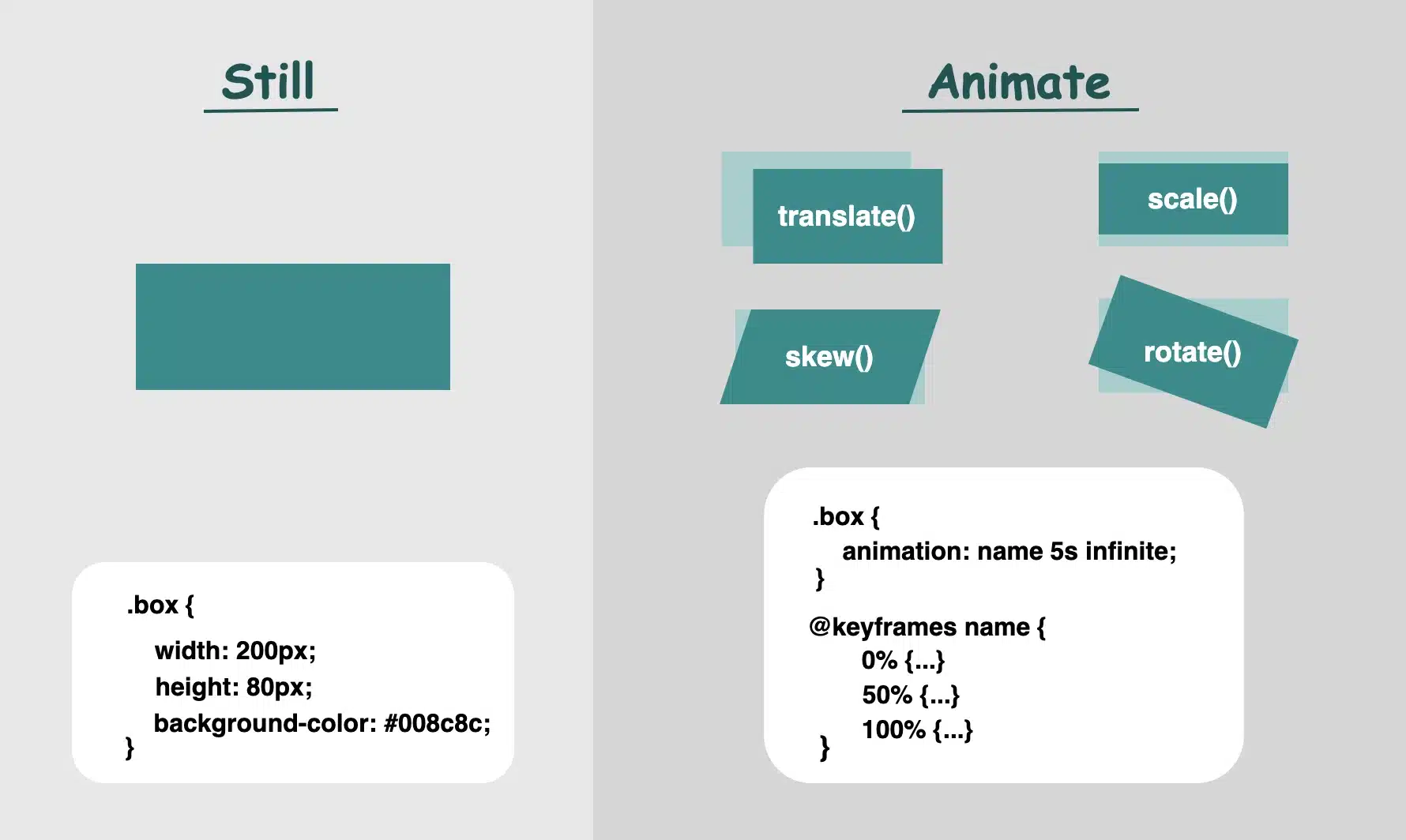
  • Static VS Dynamic Design With CSS – From Stillness to Action

    Static VS Dynamic Design With CSS – From Stillness to Action

    CSS in motion! Another perfect title for this post, as CSS is no longer just a language to style static pages, but also to elevate them with animations. CSS entered a new era and has grown into a clever tool that brings digital interfaces to life through movement. It began to shine, showing its full potential and ultimately becoming part of the experience, not just the look.

    CSS properties for movement

    Now, time to focus on where CSS credits its upgrade. Utilizing the following properties: transformtransitionanimation and @keyframes, elements can scaleslidefadespin and move through time all without a single line of JavaScript. Today, we’ll focus on understanding how these properties create such amazing visual feedback. We’ll take a step back from the code and examine these features from a more theoretical perspective: what they mean, how they influence behavior, and why they play such a crucial role in modern design.
    So, let’s zoom in! 🧐

    Transform CSS property

    It applies 2D or 3D transformations 🛠 to an element. It can change the sizerotation, position, and shape.
    Values:

    • scale(): Resize elements – making them smaller or bigger depending on our preferences (use unitless numbers).
    • skew(): Slant elements (use deg, which stands for degrees).
    • translate(): Move elements (use length units like: %pxrem, etc.).
    • rotate(): Spin elements (use deg, like skew).

    📌 Depending on our needs and preferences, we are free to make combinations with the above values.

    • perspective(): Creates a 3D effect, giving the elements a sense of depth.
    • matrix(): Creates 2D transformations. It provides a streamlined approach for applying scaling, skewing, translation, and rotation through a unified matrix. (a mathematical representation – transform: matrix(a, b, c, d, e, f) – that combines the first three transformations into a single matrix. If you want to include rotation as well, you would replace a, b, c, and d with the appropriate cosine and sine values for the desired rotation angle, while keeping e and f for translation.)

    Transition CSS property

    It animates changes in property values over time ⏳ and smoothens the transition between two stages (e.g. on hover, focus)
    Values:

    • transition-property: What property will animate (e.g. transformopacity)
    • transition-duration: How much time does the transition take to complete (e.g. 0.4ss stands for seconds, we are free to use ms too, for milliseconds)
    • transition-timing-function: Define the speed curve (easelinearease-inease-outease-in-out)
    • transition-delay: The time you wait before an animation starts (s and ms, similar to animation-duration). Its default value is 0s, which means the transition will start instantly.

    Keyframes CSS property

    Define intermediate states of an animation 📽 series. Breaks the animation into episodes 🎬, like “first episode, look like this,” “second episode, change to this,” “third episode, change to that,” and “final episode, finish like that.” Each episode represents a point in the timeline where the property-value changes (opacity, rotation, color, etc.).
    Values:

    • From / To : Timeline positions
    • Percentages % : Timeline positions

    📌 Each one represents a property-value pair that defines the appearance at a specific moment

    Animation CSS property

    It runs 🎞 a full animation based on the @keyframes you have defined. Unlike the transition we mentioned above, which moves from one point to another, animations can have many points ⏱ and follow more complex timing rules.
    Values:

    • name: the identifier of the @keyframes rule
    • duration: for how long it moves
    • time-function: how the speed flows
      • ease: it gives a smooth motion, starts slow, continues faster, and ends slow again (which is the default value)
      • linear: it has the same speed all the way
      • ease-in: it starts slow, then it speeds up
      • ease-out: it starts fast, then it slows down (Suitable for hover effects 😎)
      • ease-in-out: starts slow, in the middle spreads up, then slows down again
    • delay: if the animations begin immediately or with a delay
      • a value of 0s (seconds) indicates it starts as soon as it’s applied (which is the default value)
      • positive value that it will start after a set amount of time (e.g. 2s, which means it will start 2 seconds later)
      • negative value that starts straightforward but acts like it has already begun (e.g. -2s the animation won’t wait — it’ll jump in as if it had already been playing for 2 seconds. This can be very helpful if you want animations to be already in motion when the page loads. 😎)
    • iteration-count: how many times to repeat (infinite12, ech)
    • direction: in which direction the animation moves
      • normal ➡ the animation moves forward (which is the default value)
      • reverse ⬅ the animation moves backward
      • alternate ➡ ⬅ first forward, then backward
      • alternate-reverse ➡ ⬅ ➡ first forward, then backward, then again forward
    • fill-mode: shows how the element should look like before the animation starts or after it ends. You have the option to freeze the first or last frame so it doesn’t snap back (➡ forwards, ⬅ backwards). The default value is none, which means it does not apply any styles to the elements.
    • play-state: control if the animation is running or paused, like play ▶ or pause ⏸ buttons (runningpaused)

    📌 For an animation to actually play, we need to utilize only the: animation-nameanimation-duration and the @keyframe. All the other CSS properties are optional.

    When creating content for the web, even the smallest detail can significantly alter how something appears. The experience of bringing elements to life is amazing! It doesn’t need to be dramatic or complex. A simple yet well-structured and strategically placed change at the right moment can make everything more connected, useful and realistic.

    🌼 Hope you found my post interesting and helpful.
    Thanks for being here! 🌼

  • Coding Interview Series – Intro to Express.js & Middleware

    Coding Interview Series – Intro to Express.js & Middleware

    While preparing for a coding interview, I found myself feeling a bit rusty on theoretical questions and scenarios I haven’t dealt with recently in my everyday work. After all, a developer doesn’t have to remember everything, right? Based on experience, a developer usually just remembers something exists — or has to look it up if they’ve never built anything similar.

    So what’s this post about? This — and others coming soon — will be part of a series covering questions I believe are important for any developer to know in order to feel confident going into an interview focused on Express.js. If you can answer these questions, you should feel pretty good. You won’t know everything, but you’ll be in solid shape to show your knowledge and tackle most of what comes your way.

    For me, these are basically my notes from preparing for coding interviews, and I figured I’d share them in case they help you too.

    We also plan to share a quiz app featuring these same questions in a simple, game-like environment. We’re building it now and will share it with you soon, so stay tuned!

    Enough said! Let’s start with some simple questions and gradually go deeper. In each post, I’ll also include links to the next parts of the series.

    Each answer in this series isn’t meant to be 100% complete or the final word. The goal is to show the interviewer that you understand the topic well and can explain it clearly. There’s always room for improvement or deeper discussion.

    Some questions include additional context to strengthen your understanding or explore the topic more deeply — we’ve marked those with a 🧠 icon.

    Others will point you to related resources for continued learning or best practices — those are marked with a 🚀 icon.

    Introductory coding interview questions

    What is Express.js?


    Express.js is a web application framework built on Node.js. It provides a higher-level API for handling HTTP requests. Express.js is commonly used to build REST APIs because it simplifies route handling compared to Node.js.

    What are some alternatives to Express.js?

    • Koa.js – Created by the same team behind Express
    • Fastify – Focuses on speed and performance
    • Nest.js – TypeScript-first framework

    Why should you use Express.js over Node’s built-in HTTP module?

    Node.js provides a low-level foundation, while Express abstracts common patterns, such as routing and middleware, making development faster and more maintainable.

    🧠 Deeper – Compare Express and Node Doing the Same Thing

    It’s easy sometimes to say something is different, but it would be nice to have a quick glimpse at an actual example. Because of this, below is a simple GET / users route implemented first with Express.js and then with plain Node.js so you can see the practical difference in code size and readability.

    // Express.js
    
    const express = require('express');
    const app = express();
    
    app.get('/users', (req, res) => {
      res.json({ message: 'Users list' });
    });
    
    app.listen(3000, () => console.log('Express server on port 3000'));
    JavaScript

    In Express.js if you use res.json() (or pass an object/array to res.send()), Express automatically sets the Content-Type header to application/json; charset=utf-8. You don’t need to call res.setHeader() yourself.

    // Node
    const http = require('http');
    
    const server = http.createServer((req, res) => {
      if (req.method === 'GET' && req.url === '/users') {
        res.statusCode = 200;
        res.setHeader('Content-Type', 'application/json');
        res.end(JSON.stringify({ message: 'Users list' }));
      } else {
        res.statusCode = 404;
        res.end('Not Found');
      }
    });
    
    server.listen(3000, () => console.log('Node server on port 3000'));
    JavaScript

    Middlewares

    What is middleware in Express?

    A middleware is a function. It runs before the final route handler, and it has access to the request, response, and next callback.

    An example of a middleware on a route level could be:

    // auth middleware
    function auth(req, res, next) {
      if (!checkAuthOfUserId(req.params.id)) {
        return res.status(403).send('Access denied');
      }
      next();
    }
    
    app.get('/users/:id', auth, (req, res) => {
      res.send(`Access granted to user ${req.params.id}`);
    });
    
    JavaScript

    How many types of middleware do you know?

    There are types of middleware:

    • Global
    • Path based
    • Route specific
    • Error handling

    Examples for each would be:

    Global type middleware example

    const express = require('express');
    
    const app = express();
    
    app.use(express.json());
    JavaScript

    This middleware will run for all incoming requests, regardless of route or method.

    Path-specific middleware example

    // middleware definition
    function adminLogger(req, res, next) { ... }
    
    // Apply middleware to all /admin paths (any method)
    app.use('/admin', adminLogger);
    
    app.get('/admin', (req, res) => {
      res.send('Admin Home');
    });
    
    app.post('/admin', (req, res) => {
      res.send('Admin POST');
    });
    
    app.get('/admin/settings', (req, res) => {
      res.send('Admin Settings');
    });
    JavaScript

    A path-specific middleware will run on all HTTP methods for any route that starts with that path.

    Route-based middleware example

    function requireAuth(req, res, next) { ... }
    
    app.get('/profile', requireAuth, (req, res) => {
      res.send('Welcome to your profile!');
    });
    JavaScript

    This middleware is applied only to a specific route and will run only when a GET request is made to the /profile endpoint.

    Error-handling middleware example

    Error-handling middleware is a special feature in Express.js that catches errors and handles them in a single location. It has four parameters:

    function errorHandler(err, req, res, next) {
      // Custom error handling logic
    }
    
    JavaScript

    In Express 5, if a route handler or middleware returns a Promise that is either rejected or throws an exception, Express will automatically call next(err) for you.

    What do you know about the app.use function?

    app.use() is a method in Express used to register middleware functions. These middleware run before any route handler and can modify the request or response, or end the response cycle.

    🚀 Further reading – Using the Right Terms — Path, Route, or Handler?

    When working with Express.js, you’ll frequently encounter the terms route, path, and handler. It’s important to understand the distinction between them, as each plays a different role in handling HTTP requests.

    Let’s break it down using the following example:

    app.get('/users', (req, res) => { ... });
    JavaScript

    Path: The URL pattern that the server listens to — here, it’s '/users'.

    Route: The combination of an HTTP method (e.g., GET, POST) and a path. In this example, GET /users is the route.

    Handler: The callback function that is executed when a request matches the route. In this case, it’s the function (req, res) => { ... }.

    Routes

    What is a route in Express.js?

    A route in Express defines a specific endpoint by combining an HTTP method (such as GET, POST, etc.) with a path, along with the logic (called a handler) that should execute when that request is received.

    Example

    app.get('/hello', (req, res) => {
      res.send('Hello this is route!')
    })
    JavaScript

    What’s the difference between app.get and app.post?

    Both app.get and app.post define routes.

    • app.get() handles GET requests for fetching data.
    • app.post() handles POST requests for updating or creating data.

    How would you retrieve a route param from a URL like /users/:id?

    app.get('/users/:id', (req, res) => {
      const { id } = req.params;
      res.send(`User id is ${id}`)
    })
    JavaScript

    What’s the difference between req.params, req.query, and req.body?

    Property
    Source
    Example
    req.params
    Route parameters
    /users/:idreq.params.id
    req.query
    URL query string
    /search?q=testreq.query.q
    req.body
    POST/PUT body
    req.body.name

    needs middleware like express.json()

    Can a route have multiple middleware functions? How?

    Yes, you could add middleware by adding it to the route before the handler.

    app.get('/secure', authMiddleware, loggingMiddleware, (req, res) => {
      res.send('Access granted');
    });
    JavaScript

    What is express.Router() and why would you use it?

    express.Router() creates a modular, mini Express app. It helps organize code by separating routes into files.

    For example, you might organize all your user-related routes in a separate file, such as:

    // routes/users.js
    
    const express = require('express');
    const router = express.Router();
    
    // GET /users
    router.get('/', (req, res) => {
      res.send('User list');
    });
    
    // GET /users/:id
    router.get('/:id', (req, res) => {
      res.send(`User ID: ${req.params.id}`);
    });
    
    module.exports = router;
    JavaScript

    and then import and register them in your main Express application file like this:

    const express = require('express');
    const app = express();
    
    const userRoutes = require('./routes/users');
    
    // Mount user router at /users
    app.use('/users', userRoutes);
    
    app.listen(3000, () => console.log('Server running'));
    JavaScript

    What’s next?

    In this post, we reviewed key Express.js concepts — from routing and middleware types to error handling. These are the kinds of topics that come up often in coding interviews.

    In the next part of this series, we’ll shift gears toward project-level questions. Stay tuned!

  • How CSS Became So Powerful with Animations

    How CSS Became So Powerful with Animations

    Hi there! You’re aware that the web 🕸 wasn’t always like it is today? Websites were like digital 📰 posters – just text and images. A page loads, and no changes occur. Static design had the reins. No movement, no glow! 🤹‍♀️ ✨ Everything remained visually frozen. 🧊 🥶 CSS was only a tool to decorate that static content and make some improvements, such as selecting a font, changing colors, adding a border or a margin.

    As time went on, browsers improved, and users began to expect more. That’s when CSS started to shine and show the way from static pages to fluid experiences! With features like transition, transform, animation, and keyframes, the focus shifted from how things looked to how they can pulse and move in time. Dynamic design is finally here! CSS became a language capable of transforming static HTML elements into dynamic 🧨 ones.

    Motion matters. It allows users to feel when something changes and witness how elements react. It’s a way of communication, 🔊 not just decoration. With only CSS, designers can craft these interactions. Creating animations that ‘rotate‘, ‘skew‘, scale‘ or ‘shift‘ position suggests ongoing system activity. A sliding menu, like a ‘hamburger icon‘, reveals categories, indicating that navigation continues beyond the current view. A spinning icon, after a user clicks ‘Submit’ or ‘Save’ on a button, signals that a process is loading. A button that gently fades in and out on hover – labeled ‘Sign Up‘ – asks for interaction. A fading alert, such as ‘Connection lost‘ or ‘Download has failed, retrying‘, quietly suggests that the message is temporary. Even a ‘scale-up‘ focusing on an image can reveal that it is active. CSS became a must to represent progress and maintain users’ attention.

    Of course, as with everything, setting boundaries is essential. Many times action can cause confusion and make users feel distracted or, even worse, rushed. Not every interface needs to include movement. Sometimes, picking stillness is the best choice. Valuable designs recognise when to pause!

  • The Truth About CSS: Is It Really a Programming Language?

    The Truth About CSS: Is It Really a Programming Language?

    Is CSS a programming language? If you’ve ever wondered, read the following post and discover 🔎 why you might reconsider asking that question!

    A programming language is a tool 🛠 that enables developers to instruct computers to perform tasks or calculations. Developers achieve this by writing code that tells the computer what to do step-by-step, much like giving commands to execute specific outcomes. It consists of rules that a computer can understand and execute. 😎

    CSS (Cascading Style Sheets) is not considered a programming language. It is a style sheet language that defines how HTML elements should be displayed on a webpage and controls their layout, colors, fonts, and spacing.

    Below, I have prepared an example to help you better understand what CSS does. Also, you’ll see an image displaying the HTML and CSS code snippet used in the example.

    As we already said, CSS contains rules. Each rule typically includes a selector (which identifies the HTML element to style) and the declaration block {...} (which specifies the styling properties and their values). In our example, h1 is the selector, and background-color: pink; , color: indigo; and font-size: 25px; are declarations.

    <h1>Enjoy working with CSS!!</h1>
    HTML
    h1 {
      background-color: pink;
      color: indigo;
      font-size: 25px;
    }
    CSS
    Is CSS a programming language - Text writing: Enjoy working with CSS

    Remember that if you want to include interactive functionality in your projects, programming languages are invaluable tools you can leverage. 🧨 ✨

  • Is HTML a Programming Language? Find Out Now!

    Is HTML a Programming Language? Find Out Now!

    Understanding the role of a programming language is the key 🗝 to answering the question “Is HTML a programming language?”. 🧐

    To put it simply, the answer is no, HTML is not a programming language.

    HTML stands for HyperText Markup Language, a type of markup language used for creating structured content. But what does that even mean? Let’s break it down a bit.

    Markup Language

    A markup language is a system for creating structured text in a way that both humans and machines can read. It consists of tags or elements known as building blocks. These tags are responsible for the structure of the web page defining how its content is organized and formatted. Some examples of such elements would be <h1> for headers, <a> for links, <p> for paragraphs, <footer> for footers.

    HyperText

    The term “hypertext” is part of the name because it allows text to include links – called hyperlinks – to connect to other pages. Turning text into a hyperlink makes it easy to navigate between web pages.

    By combining hypertext and markup, we get HTML, which is a language that structures web pages while also adding links to make them somewhat dynamic by connecting to other resources.

    That’s pretty cool, but even though we have defined a “smart” language, the question still remains: Is HTML a programming language?

    Getting to the answer: Is HTML a programming language?

    We can undoubtedly say that a programming language gives precise instructions to a computer or other devices to perform specific tasks, process data and create interactivity. Programming languages can build everything from simple scripts to complex applications, empowering developers to create tools and software that automate and enhance systems.

    While HTML structures and displays content, it lacks the ability to process logic or perform tasks like a true programming language.

    A quick glimpse at how HTML is written

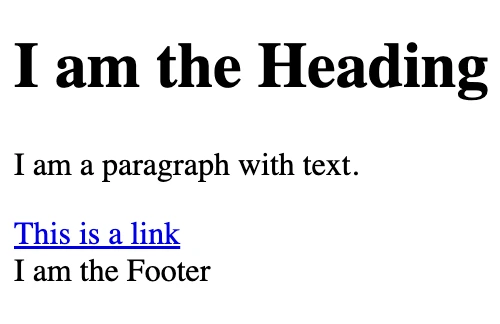
    Below, I’ve included a simple HTML code snippet with an image to illustrate how the HTML actually works. In this case, it only defines the structure of a heading, a paragraph, a link, and a footer. It doesn’t involve processing, which is the role of programming languages. 😉

    <h1>I am the Heading</h1>
    <p>I am a paragraph with text.</p>
    <a href="https://example.com">This is a link</a>
    <footer>I am the Footer</footer>
    HTML
    Is HTML a programming language?
An image with a heading tag, a paragraph tag, a link tag and a footer tag.

    To make websites dynamic or interactive, we have to combine HTML (for structure) with CSS (for styling) and Javascript (for functionality and behavior). The last one is an actual programming language. 😃 ✨

  • How To Use A Javascript Double Question Mark​

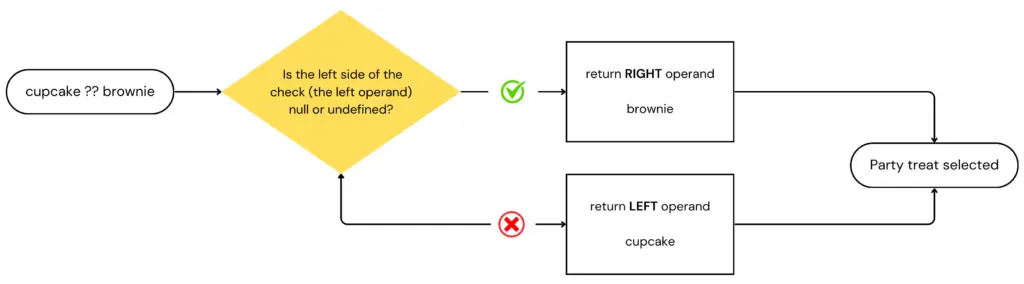
    The Javascript double question mark​ ?? is known as the nullish coalescing operator. It is a logical operator useful for checking whether a value is undefined or null, allowing us to provide a default value based on that check.

    How does the Javascript nullish coalescing operator work? 🧁

    Suppose we want to decide on a party treat based on whether a cupcake is available. If the cupcake is missing (i.e. it’s undefined or null), we’ll go with the brownie instead.

    const partyTreat = cupcake ?? brownie; 
    JavaScript

    The operator ?? in this snippet returns the right-hand operand – brownie – when the left one – cupcake – is null or undefined.

    For those of you who immediately jumped, shouting that this is the same as the logical OR operator ||, hang in there, I’ll get to you soon.

    So, to make this crystal clear, let’s see the possible scenarios:

    • If the cupcake is null or undefined, then our partyTreat will be a brownie.
    • If the cupcake is anything other than null or undefined, then our partyTreat will be the cupcake.
      I just hope they actually bring a real cupcake, not a truthy version of it… 🥶 (A cold programmer’s joke 🤣).
    javascript double question mark​ flow diagram
    Flowchart of the ?? operator: how JavaScript handles nullish values

    Choosing the Right Operator: ?? or ||?

    When it comes to handling default values in JavaScript, understanding the difference between the nullish coalescing operator (??) and the logical OR operator (||) is essential.

    While both operators can provide fallback values, they behave differently with certain inputs.

    The nullish coalescing operator returns the right-hand operand only if the left-hand operand is null or undefined, making it ideal for cases where you want to avoid falsy values like 0 or ''.

    In contrast, the logical OR operator returns the right-hand operand for any falsy value, including 0, NaN, or an empty string.

    By now, I am sure you understand that the nullish coalescing operator is a special case of a logical || operator, right?

    So, they are different, but what would be a use case where one operator is preferable over the other?

    Let’s assume we have a function that gets us a user’s score

    // Logical operator || example
    function getUserScore() {
      const finalScore = score || 100; 
      ...
    }
    
    // Nullish coalescing operator ?? example
    function getUserScore() {
      const finalScore = score ?? 100; 
      ...
    }
    JavaScript

    In the first case, if the score is 0, which is falsy, then the finalScore ends up being assigned the default value of 100, even though 0 might be a legitimate score.

    In the second case, that won’t happen. 0 is neither null or undefined, so the finalScore will end being 0, which is indeed a valid score.

    Frequently Asked Questions

    Can I combine the nullish coalescing operator with other operators in Javascript?

    Yes, you can combine the Javascript nullish coalescing operator (??) with other operators to create more complex logic in your code. For example, by writing something like

    const defaultValue = hasUserInput ?? (isAdmin && fallbackValue);
    JavaScript

    we first evaluate if the user has entered a value (such as in a form). If userInput is null or undefined, we then evaluate whether the user is an admin.

    If the user is an admin, result will be assigned the fallbackValue. If the user is not an admin, result will be false instead.

    How can I chain multiple nullish coalescing operators together?

    You can chain multiple nullish coalescing operators to evaluate different variables. For example, if you have several fallback options, the operator will return the first defined value it encounters:

    const partyTreat = cupcake ?? brownie ?? defaultTreat;
    JavaScript

    Have you encountered any situations where one operator has significantly impacted your coding experience? If so, please share your examples in the comments below. We’d love to hear your insights!

  • Best Job Sites for Web Developers

    Best Job Sites for Web Developers

    If you feel like you’re the only one struggling to find remote web developer jobs, let’s clear that up — you’re not alone! We’ve been in your shoes, and we might still be there right now. During our search, we realized that while some remote job sites are easy to find, others are buried deep (thanks, SEO), and some lists of remote job sites are hidden behind paywalls (we won’t name names).

    To make things easier for everyone, we compiled a list of websites offering remote web developer jobs – and more – for anyone seeking remote work, regardless of the field.

    We hope this helps you reach your goal!

    If you manage a site that showcases remote developer jobs, we’d love to hear from you! Contact us to be added to our list. Reach out in the comments or visit our Contact Us page.

    General boards for remote jobs

    General remote job boards are fantastic resources for discovering flexible work opportunities across various industries! These platforms showcase a diverse range of listings in fields like tech, marketing, and customer service, making it super easy to find and apply for remote positions that suit your style. Below, you’ll find a curated list of the best remote job boards to kickstart your remote career!

    EU Remote Jobs

    EU Remote Jobs is a frequently updated job board focused on remote opportunities within Europe. It’s a great resource for web developers, offering a wide variety of roles across frontend, backend, and full-stack development.

    The site is easy to navigate, with clear categories and filters that help you quickly find positions that match your skills. New jobs are posted regularly—sometimes multiple times a day—so there’s always fresh opportunities to explore.

    While the focus is on roles available to candidates based in Europe, many listings are open to international applicants as well. Whether you’re looking for a full-time position or freelance gigs, EU Remote Jobs is a solid place to find consistent, high-quality leads.

    We Work Remotely

    We Work Remotely is an excellent website for finding remote web developer jobs in tech, programming, design, and startups. It has a clean and easy-to-use layout, making it simple to browse different job categories. According to their site, “For over a decade, WWR has been the number one destination to find and list incredible remote jobs. We’re home to the largest remote work community in the world with 4.5M visitors.

    The site offers various jobs in programming, DevOps, design, product, customer support, and sales, clearly showing whether they are full-time or contract roles.

    Gun.io

    Gun.io is a platform designed for developers to connect with remote job opportunities while keeping 100% of their set rate. You start by creating a comprehensive profile highlighting your work history and preferred languages, which helps the team match you with roles that suit your skills.

    Once your profile is complete, senior-level developers review it to ensure you’re a great fit for potential positions. Gun.io also provides support throughout your freelance journey, making it easier to focus on your work while ensuring you get paid what you deserve.

    4 day week

    4 Day Week is a fantastic platform that promotes the four-day workweek and one you should not ignore! Here, you’ll find various remote job listings that embrace this innovative work model, allowing you to enjoy a better work-life balance while still achieving your career goals. Dive into a world where you can maximize productivity and enjoy your long weekends!

    Remote OK

    Remote OK is one of our top picks for finding remote jobs, offering roles for developers, designers, copywriters, and customer support representatives. Its beautiful user interface and simple, easy-to-use filters make it easy to find full-time remote work or remote part time jobs that fit your needs.

    Trusted by major companies like Microsoft, IBM, and Amazon, the site also highlights that you can reach up to 1.9 million remote workers when hiring, making it a go-to resource for companies and job seekers alike. Whether you’re looking for tech or non-tech positions, Remote OK is a fantastic platform to explore!

    Jobspresso

    Jobspresso is a trusted platform for finding remote jobs in fields like tech, marketing, customer support, and more. Each listing is carefully selected and reviewed to ensure top-quality job opportunities. From software development and AI roles to content writing and sales, Jobspresso offers various remote work options.

    Remotive

    Remotive stands out as a remote jobs platform with a unique focus on community and flexibility. Created in 2014 by Rodolphe Dutel, Remotive has attracted over 500,000 followers across social networks.

    It’s perfect for people who want to work remotely, whether you’re looking to ditch the commute, need a career-focused part-time role, or want a more flexible schedule. As their site says, Remotive is great for “anyone who wants to work remotely,” including parents seeking better work-life balance or professionals looking for alternative schedules.

    FlexJobs

    Flexjobs is a platform established in 2007 by Sara Sutton to simplify the search for reliable remote and flexible job options. After facing frustrations with misleading job ads, she created a site that features thoroughly vetted job listings in more than 50 industries, catering to everyone from entry-level applicants to executives.

    With a commitment to quality, FlexJobs offers valuable resources and insights to help job seekers make informed decisions while providing a satisfaction guarantee to ensure a positive experience.

    JobRack

    JobRack is a valuable platform connecting skilled professionals in Eastern Europe and South Africa with remote job opportunities. It features a variety of roles across multiple industries, making it easier for job seekers to find positions that match their skills and preferences.

    Whether you’re seeking full-time or part-time work, JobRack helps you connect with employers who appreciate talent and flexibility.

    JustRemote

    JustRemote is a platform dedicated to helping individuals find authentic remote job opportunities across various fields. Their mission is to connect job seekers with reputable employers and make remote work accessible to everyone.

    The site features carefully curated job listings in categories such as business, customer service, development, design, and marketing. While it primarily caters to U.S. residents, Just Remote also provides remote positions for applicants in numerous countries worldwide.

    By simplifying the job search process, Just Remote empowers people to discover fulfilling remote work.

    Working Nomads

    Working nomads is a job board that connects remote workers with quality opportunities across various fields, including administration, development, marketing, and writing.

    Their listings also include remote part-time jobs and contract positions from trusted companies. When this was written, their premium package provided access to over 30,000 remote jobs, making it easier for job seekers to find the right fit. Working Nomads helps seasoned professionals and newcomers discover their ideal remote role with daily or weekly job alerts.

    Remote.co

    Remote.co is a great platform for finding high-quality remote work opportunities in fields like tech, marketing, and customer support. Featured in Forbes and CNBC, it offers a wide range of job listings to help job seekers. With helpful resources and articles about remote work trends, Remote.co is a valuable tool for anyone looking for a remote job.

    Arc

    Arc is a platform that connects top tech talent with remote opportunities, focusing on high-quality job matches for developers and other tech professionals to thrive in a remote work environment.

    Pangian

    Pangian is a global remote job board that specializes in connecting job seekers with remote roles in various fields, promoting a diverse and inclusive work culture for professionals worldwide.

    Honorable mentions

    Here are some honorable mentions—additional job boards that serve as exceptional resources for finding remote work opportunities.

    Wellfound

    Wellfound – A platform for connecting startups with talented professionals seeking remote and flexible job opportunities.

    Jobgether

    Jobgether – A user-friendly site that lists remote jobs across various industries, making it easy to find your next opportunity.

    Himalayas

    Himalayas – A curated job board for remote jobs at innovative companies focusing on technology and startups.

    Remote4me

    Remote4me – A platform that aggregates remote job listings from various sources to simplify your job search.

    Remote Woman

    Remote Woman is job board specifically for women seeking remote work opportunities in tech and other fields.

    Euro Remote Jobs

    Euro Remote Jobs is a job board dedicated to remote jobs in Europe, featuring a wide range of positions from various companies.

    Lemon.io

    Lemon.io is a platform that connects companies with skilled developers, focusing on providing high-quality remote tech talent while ensuring a smooth hiring process.

    Ruby on Remote

    Ruby on Remote is a dedicated job board for Ruby developers featuring a curated list of remote job opportunities specifically tailored for professionals with Ruby skills across various industries.

    Don’t give up. The right remote job is out there!

    Remote junior developer jobs

    Yes! You saw that right! This section is for remote jobs for juniors. So many people are trying to get remote jobs as juniors and struggle to find them. Well, the market has listened… well, actually some developers did, but hopefully the market heard your voices too! As I was saying…some developers have created job boards just for junior developers. Here you go! Enjoy the ride, newcomers!

    Remote Rocketship

    Remote Rocketship offers a collection of entry-level remote jobs across various fields, making it easier for newcomers to kickstart their careers.

    Entry Level Remote Job

    Entry Level Remote Job is a dedicated platform that connects job seekers with remote opportunities specifically designed for those starting their careers.

    Best freelancer websites

    If you don’t want to focus all your energy on one client and prefer to find gigs or part-time projects, this section is for you. Below, you’ll find a list of platforms where you can discover multiple freelance opportunities.

    Toptal

    Toptal is a freelance platform that connects top professionals with companies needing remote talent. It’s famous for its tough selection process, accepting only the top 3% of applicants, so it’s not for the faint-hearted.

    With opportunities in software development, design, and finance, Toptal is trusted by companies like Airbnb and Shopify. It’s a great option for freelancers seeking high-quality projects and businesses looking for the best talent.

    Upwork

    Upwork is one of the largest and most popular freelance marketplaces, offering a wide variety of remote job opportunities in fields like web development, design, writing, and marketing.

    Freelancers can create profiles, bid on projects, and connect with clients from around the world. Upwork has remote jobs for all experience levels, from beginners to experts, making it an excellent platform for anyone who wants to start or grow their freelance career.

    Fiverr

    Fiverr is a popular freelance platform where professionals can offer services starting at $5, covering everything from graphic design and writing to voiceovers and web development.

    Freelancers create “gigs”, and clients can easily browse and purchase services. With its straightforward interface and wide range of categories, Fiverr is an excellent choice for freelancers seeking specialized services and clients needing quick, affordable solutions.

    Freelancer

    Freelancer is a global freelance marketplace where businesses can post projects, and freelancers can bid to get hired. Covering a wide range of categories like software development, writing, accounting, design, translation, data entry, and much more, it’s a platform suitable for all skill levels.

    With contests and time-tracking features, Freelancer helps beginners and experienced professionals find remote work opportunities quickly and efficiently.

    PeoplePerHour

    PeoplePerHour connects freelancers with clients seeking specific skills, particularly in tech, marketing, and design. Freelancers can apply for posted jobs or offer services in their own “Hourlies” — pre-packaged services at set prices.

    Known for its ease of use and quality listings, PeoplePerHour is a solid choice for freelancers wanting flexible projects and clients looking for skilled professionals.

    Turing

    Turing is a platform designed to simplify the hiring process for global talent. Founded by Jonathan Siddharth and Vijay Krishnan, who faced challenges in sourcing high-quality talent in their previous venture, Turing combines comprehensive candidate profiles with a strict vetting process.

    Launched in 2018, Turing has become a leading provider of AI-driven solutions, matching companies with skilled professionals for product development and engineering projects. With its innovative approach, Turing has earned the trust of numerous companies for their AI deployment, large language model training, and custom engineering requirements.

    X-Team

    X-Team is a unique platform that connects companies with top developers from around the world. Founded on the belief that work should be fulfilling, X-Team empowers its developers by providing them with opportunities to work remotely while continuously honing their skills. With a rigorous selection process, X-Team ensures that only the best talent joins its ranks, allowing companies to tap into a diverse pool of skilled professionals. Their emphasis on team culture, support, and ongoing learning has made X-Team a preferred choice for businesses looking for dedicated developers to drive their projects forward.

    Codeable

    Codeable is a platform that connects clients with expert WordPress developers. With a focus on quality, Codeable vets its developers to ensure only top-tier talent is available for hire.

    Job boards with remote filters

    While not solely focused on remote work, popular job boards like Indeed and LinkedIn offer filters to help you find flexible remote work opportunities. Here are a few top sites where you can search for remote positions:

    Linkedin

    Linkedin is a professional networking site with a filter for remote web developer jobs, allowing you to search within your field.

    Glassdoor

    Glassdoor although primarily known for company reviews, it also provides options to filter remote job listings.

    Monster.com

    Monster.com – A well-known job board that features filters to help you find remote job opportunities.

    We’ll continue to update this post whenever we discover new remote job websites, so be sure to bookmark this page for future reference!

    How to get the most out of remote job boards

    Finding remote web developer jobs isn’t just about knowing where to look — it’s also about how you use these platforms. Before applying, make sure your resume and portfolio clearly highlight your remote experience, communication skills, and ability to work independently. Many companies hiring remotely care just as much about collaboration and reliability as they do about technical skills.

    If you’re a junior developer, focus on job boards that explicitly mention entry-level or junior-friendly roles, and don’t be discouraged by listings that ask for “experience” — many are flexible if you can show strong fundamentals and real projects.

    For freelancers, platforms like Toptal, Upwork, and Codeable reward specialization. Niching down (for example, “React performance optimization” or “WordPress security”) can significantly improve your chances of landing consistent remote work.

    Remote work opportunities change fast, so checking these job boards regularly, setting up alerts, and staying active will dramatically increase your chances. This list is updated often to help you stay ahead of the curve.

    Common mistakes when applying for remote web developer jobs

    One of the biggest mistakes developers make when applying for remote roles is sending the same generic application everywhere. Remote-first companies often receive hundreds of applications, so small details matter. Tailor your resume to highlight relevant skills, real-world projects, and tools mentioned in the job description.

    Another common issue is ignoring time zone and availability requirements. Even fully remote teams often expect some overlap in working hours, so make sure you’re clear about your location and schedule upfront to avoid wasted applications.

    Finally, don’t underestimate the importance of your online presence. A well-maintained GitHub profile, live demos, or case studies can make a big difference — especially for junior developers or career switchers who may not have extensive work experience yet.

    Happy job hunting! 🚀

  • The Burnout Syndrome – How to Identify and Overcome It

    The Burnout Syndrome – How to Identify and Overcome It

    In today’s fast world, especially in web development and programming, the pressure to continuously deliver elevated code can be really stressful. Long hours spent in front of laptops and tough deadlines. Additionally, the persistent dream of perfection and leadership can negatively affect even the most passionate and devoted developers.
    This intense environment often leads to burnout syndrome, a state of emotional, physical, and mental exhaustion that can significantly impact your personal and professional life.

    Signs that Indicate You Are Experiencing Burnout Syndrome

    Burnout can be incredibly challenging, especially in programming. It is often caused by long hours, high pressure of time, and a constantly changing technological landscape that requires continuous learning and adaptation. Below are some ways to recognize burnout syndrome. Identifying these signs early can help you take action to manage and prevent this situation, ensuring you stay healthy and productive.

    Battling (or Paddling) Against the Tide of Decreased Productivity

    We begin with the strongest and most obvious sign of burnout. You are not productive anymore. Your energy for work drops, and you feel unable to cope with continuous demands. You find it hard to concentrate, and eventually, you find yourself making more mistakes than usual. Occasionally, it’s hard to finish tasks on time.
    Additionally, meetings can be confusing, sometimes you might feel like you are not really there. Working with others can also be tricky because you constantly feel that you are not good enough for this job and can’t cope with your work duties.

    Lack of Motivation and Interest

    Another clear indicator of burnout is that stress can result in a lack of interest and motivation in things that were previously meaningful to you. Tasks that once excited you now feel like enemies that only push you and cower 🥊 you to the corner.
    There is a lack of motivation. Although you want to be creative and productive, you always feel tired and lazy, making it difficult to start new projects or complete things you’ve already taken on.
    As time goes by, this becomes more and more intense, and eventually, you lose interest at all. You don’t care about work, life, activities, or, worse, about people. Everything seems stressful and meaningful.

    The Awful, Never-Ending Exhaustion

    A further prominent signal of burnout is the persistent feeling of exhaustion, which encloses both physical and mental tiredness. This condition appears as a constant sense of tiredness, accompanied by feelings of frustration and despair that may become part of your daily experience.
    Additionally, you may experience difficulties with memory retention and problem-solving, and you may lack the ability to concentrate and think creatively or critically. Moreover, this level of exhaustion usually leads to physical symptoms such as headaches, sleep disorders, and various stress-related health issues.

    Struggling with Negativity and Loneliness

    Eventually, you develop extremely negative and critical feelings about yourself, your work, and those around you. It’s hard to find pleasure and happiness in your accomplishments and in your relationships with colleagues or other people outside of your working environment.
    Also, you seem to be experiencing a noticeable emotional disconnect. You appear to feel detached from your work and associates, and as a result, you find yourself seeking isolation on a frequent basis.

    How to overcome Burnout Syndrome

    When things get tough, it’s really important to take care of yourself first. Adopting the following methods can help you overcome burnout and maintain a healthier, more balanced work and life approach.

    Set Boundaries: Saying No and Prioritizing Tasks

    The most important factor in avoiding burnout is to educate yourself to say no. Refuse to take on additional work if you are already busy, and don’t feel obligated to do things you are not responsible for. It is crucial to respect your working environment, but it’s equally important for your working environment to respect you.
    Furthermore, prioritize your tasks. Break your projects into small, manageable pieces. In addition, create a diary with clear work hours and guard your personal time by avoiding reviewing emails or working late into the night or on weekends. Also, it is really critical to understand that you have to stop using your personal mobile phone or social media for work.

    Recharge with Self-Care, Breaks and Hobbies

    One effective way to maintain productivity and mental well-being during work is to ensure you get enough sleep, eat healthy food, and aim for balanced meals consumed regularly throughout the day. Taking care of your body helps your mind stay sharp.
    Additionally, include regular breaks on a daily basis. Taking short breaks, such as going for a short walk, can significantly contribute to refreshing your mind and re-energizing your body.
    Dedicate time to engaging in both cognitive and physical activities that fill you with joy and satisfaction beyond your work duties. For example, enjoy cognitive and creative activities such as painting and making puzzles or physical activities like volleyball and running. Hobbies can improve a relaxing and vital break, allowing you to restore energy and also enhance your mental and physical health.

    Build a supporting network

    Remember to seek support from others when you need it. Talk to friends, family, or colleagues about your situation and express your feelings. Sometimes, just sharing can relieve some stress. Count on your loved ones for advice in order to simplify your thoughts and discover other viewpoints.
    If you continue to feel crushed by burnout, seeking assistance from a therapist or counselor could be beneficial. They can suggest techniques for facing your difficulties and propose strategies to help you cope and recover.

    From Stress to Serenity – One Free Afternoon for Yourself

    Finally, keep at least one afternoon inside the week for yourself and schedule Nothing. Yes, you read it correctly. Nothing. React spontaneously. Think. What do you really need at this moment? What are your thoughts right now? Don’t think of anyone else. Just yourself. Turn an afternoon into a mini vacation and spend it focusing only on you.
    What do you miss most? Is it a walk? 👟 Maybe shopping therapy? 🛍 No? So, what is it? Something more relaxing? Reading a book 📗 close to your cat? 🐈 Still no? Oh! I found it! You just need to grab a coffee, a donut, your skateboard and play in the park! Oh, yes! That’s it for today!
    Something brand new is coming your way next week! Get ready and enjoy every moment!

    Recognizing and handling burnout syndrome is crucial for having a sustainable and also satisfying career in web development and programming. By setting boundaries and realistic goals, prioritizing self-care, fostering a healthy work-life balance, surrounding yourself with people and activities you prefer, and ensuring free time, you can protect yourself from the harmful effects of burnout. Remember, you are as important as the code you write. Take time to rest and recharge, and you’ll find yourself not only more productive but also more passionate about your work. See you around! 🎈✨

    Cute happy astronaut.
    Image by catalyststuff on Freepik
  • Unmasking Impostor Syndrome In Tech: Watch Out For These Signs

    Unmasking Impostor Syndrome In Tech: Watch Out For These Signs

    Impostor syndrome, also known as impostorism, is the feeling that you’re not as good as others think you are, even when you have proof of your success. In simple words, lack of confidence. It is often accompanied by the fear of being exposed as a fraud.

    It can affect anyone, regardless of their accomplishments. It can make you doubt yourself and believe that your achievements are due to luck rather than your own skills. This feeling can impact everyone, from students and professionals to famous people.

    In our competitive world, many people struggle with these thoughts. Realizing impostor syndrome and learning how to deal with it is essential for building confidence, maintaining a healthy and positive mind, and, by extension, enhancing one’s quality of life.

    How to recognize if you suffer from impostor syndrome?

    Recognizing impostor syndrome can be the first step toward managing it. Below, I will outline some of the most important signs to watch out for.

    Shadows of yesterday

    It often originates from our childhood and the way we grew up. It is widely accepted that many parents can either overly compliment or criticize their children, sending mixed signals that can confuse them. They hesitate to let their children try new things, fearing others will criticize failure and cause ridicule. In that way, children get used to the idea that they are not worth the opportunity to try.
    These behaviors leave imprints 🐾 on children’s minds and get deeper and deeper day by day. Eventually, they end up feeling like pawns, these lowest-value ♟ pieces, on a chessboard.
    Instead, they should encourage their children to try new things and welcome failure as a valuable learning experience, regardless of others’ thoughts.

    Keep bearing your challenging past

    Later, as an adult, impostor syndrome affects you as you have convinced yourself that you are a “broken vessel” and not well prepared for real life. You may even notice that you tend to set extremely high standards for yourself. You struggle to overcome the past and prove that you deserve something like everyone around you.
    You might feel disappointed when you don’t complete some goals, even if, many times, those plans are utopian.
    On the other hand, when you complete your goals, you will catch yourself downplaying your victories as you continue feeling that you are not capable of handling things.

    Masquerade – The False Sense of Deception

    Another clear indicator that you might struggle with this awful syndrome is that you often feel exhausted from over-preparing or overworking to cover up your falsely claimed lack of skills. You feel like you’re “faking it” at any moment, doubting and challenging yourself about your own abilities. Deep down, it seems like hiding your real self and wearing a mask that doesn’t fit right.
    I have to note that it’s a really confusing situation. It’s as though you repeatedly place hurdles in your own path and sabotage yourself.

    Frozen by Fear – How It Holds You Back

    Finally, the fear of failure. This fear can be so strong that it literally makes you feel stuck. You become anti-social. It stops you from being creative and taking risks that could help you learn and grow. It prevents you from taking on new challenges, seeking opportunities, or making decisions.
    You may constantly compare yourself to others, feeling that you’re not as talented or capable despite evidence to the contrary.
    Eventually, it can make you feel really unhappy and even affect your mental health. You will soon start feeling lonely, helpless, anxious, and weak, and occasionally depression and isolation can take you down.

    How to deal with impostor syndrome

    Handling impostor syndrome involves reconsidering, which means changing how you think and react to yourself and your plans for life, whether they are accomplishments or failures.

    Embracing Self-Love: Accepting Your Situation and Valuing Yourself

    Start by accepting your feelings. Keep in mind that many people experience these same thoughts. You are not alone. It’s just a common reaction to high pressure and expectations.
    Practice self-compassion by treating yourself with the kindness and understanding you would offer a friend. Be kinder to yourself. Try to avoid negative thoughts and replace them with more balanced and positive thinking.

    Setting Achievable Goals: A Pathway to Success

    Setting realistic goals. This can be the most crucial decision. Breaking down big tasks into smaller, manageable steps will help you handle them better, feel less stressed, and keep moving steadily toward your goals.
    Also, believe it or not, it’s important to celebrate each achievement along the way. Whether small or big, each step signifies a victory on the journey toward your goals. Do not underestimate it!

    Creating Effective Programs with Smart Planning

    Start keeping notes. It serves as a powerful tool for self-reflection. Write down your personal accomplishments as a strong reminder of your capabilities and successes. Maintaining a diary with plans is substantial evidence of your growth, boosting you to dive into future challenges with faith and enthusiasm.
    Checking ✅ your notes is always a good idea! Celebrate your successes with pride and take time to examine your failures. By understanding what went wrong, you pave the way for future triumphs. Be confident! You will blossom in your next attempt.

    Discovering Strength Through Support

    Reaching out support from others is absolutely essential, too. Let it be ingrained in your memory that you are incredibly valuable to some people. This unique sense of being heard and understood can be extremely comforting and validating for you.
    Talk to friends, family, or mentors about your feelings. Trust them and lean on their shoulders. You can count on their love and help. They can offer honest opinions and critiques, multiple perspectives, and, most importantly, remind you of your worth!
    After all, they are connections that can open doors to new opportunities and experiences. How calming is that?

    Confident Endurance – Continuing the Journey with Determination

    Eventually, it’s time to fight with your ghosts! Build self-confidence. If impostor syndrome persists and affects your life significantly on a daily basis, consider professional help from a therapist or consultant. They can provide invaluable guidance and propose techniques to empower you.
    Furthermore, they will help you overcome these feelings and reveal your strengths and skills. Always remember you belong to yourself and you are free to live your life as you wish!

    Overcoming impostor syndrome requires time and persistence. It involves regularly reminding your own value, celebrating your accomplishments, and sometimes getting help from others to change how you think. By recognizing it, you have to take steps and fight it. You will start to believe in yourself and appreciate your achievements. Remember that occasional doubts are normal, but they do not define who you are. Sooner or later, understanding and fighting impostor syndrome helps us reach our full potential and enjoy life to the fullest.

    Are you ready to go? 🧨✨ Wishing you all the best! 💖💖

    Astronaut riding space rocket
    Image by catalyststuff on Freepik
  • How to Improve Pull Requests: 3 Basic Rules

    How to Improve Pull Requests: 3 Basic Rules

    In this post, I would like to share some thoughts that have helped me structure and enhance a pull request from the perspective of both the author and the reviewer. If you’re looking to create better pull requests, this post is for you.

    While writing this post, I am thinking mostly of GitHub, but I am sure that my thoughts apply, with a bit of modification maybe, to other platforms, too.

    So even if you are already the best on pull requests, maybe there is still room for improvement? 😅

    High five scene from the Anchorman movie
    Anchorman: The Legend of Ron Burgundy (2004)

    Just kidding, I am sure you are doing great and I know this post will ignite excitement among those with more basic and advanced skills.

    Screenshots for UI changes

    Whenever I’ve found myself working on frontend features, I’ve seen that it can be tough to understand UI modifications by just reviewing markup. An experienced developer might be able to catch any peculiar HTML/CSS code usage, but understanding exactly what’s changed on the UI requires supernatural abilities. 🦸

    (Have to say, it’s not a myth! I’ve met a developer with such skills! They truly exist out there!)

    So what can you do to help improve the process? One way to help your reviewers do a better job is by including screenshots of the UI changes you made through your pull request, rather than letting them review only the code differences.

    Think about it. Which one feels easier to understand? Seeing something like this:

    Or review it with a screenshot attached, like this:

    By adding screenshots, you can give your colleagues a clearer understanding of what you’ve implemented and, at the same time, increase the chances of catching a bug before it gets deployed! 🐛

    Extra points 🧐

    • Attaching an image to show how the UI looked before your tweaks, could also improve the review process. Something like before – after.
    • Including mobile/tablet screenshots may also help in identifying a potential issue by seeing the UI changes for all devices, while QA testing.

    QA testing (Quality Assurance), is a process that amongst others, includes, checking if a code change (feature/bug) was implemented correctly. This is often done by a QA engineer/tester. Some QA testing also takes place by the actual developers, implementing a feature, before they send it for review.

    For minor UI changes adding screenshots is probably an overkill. I am sure your reviewers will be able to understand what’s changed without seeing an image. 😎

    Proactive comments for better pull requests

    Sometimes it can be difficult for me to understand if I have implemented something “correctly”. Especially when working on a large codebase, with many collaborators, it’s important to follow the agreed-upon coding guidelines.

    If you find yourself in a situation like this, don’t hesitate to ask for help by highlighting the pieces of code for which you don’t have much confidence. How? Simply by adding an emphasis comment. Just like adding a review comment in your own pull request, state your concerns so that your reviewers will pay extra attention, like this:

    As a result, your reviewer will conduct a more thorough review of the code modifications, and as a result, you’ll feel more confident about your pull request when it finally gets deployed.

    Improving the pull request title

    One of my favorite ways to improve a pull request is by adding suffixes to the titles. So, for example, let’s consider the following title:

    Better Github pull requests - nothing on title

    Although this is a nice pull request title, it still doesn’t provide answers, simply by checking the pr listing, to the following questions:

    • What’s the branch this pr is merged into?
    • What is the related issue?

    Let’s try and see how we can improve it, by changing its structure a bit. Our goal is to be able to extract more concise information simply by looking at the pr title.

    Adding the target branch

    It’s common for projects to have some basic branches, apart from the main one (old master). These branches are usually for QA testing or client demos, client playgrounds, etc.

    If you are working on a project like that, you might find yourself creating multiple requests per branch for various reasons. One pull request for QA testing, one pull request for the final deployment to the main branch, and so on.

    But if you do so, there is no way to identify the branch through the pr’s title, right? So what I prefer doing is just adding a simple suffix with the branch’s name. By doing so, if I have pull requests of the same feature to multiple branches it’s easier for me to understand what’s what.

    Better Github pull requests - Branch on title

    Showing the related issue

    Another interesting suffix that works perfectly for GitHub (and I assume in a similar way for other platforms too) is adding the issue number in your pr title.

    (If you are using a workflow in which you create a GitHub issue before working on a new feature, then this is for you)

    Let’s assume you have created a GitHub issue with the number #312. After deploying your changes to the last branch, you might find yourself going through the GitHub Issues list and trying to find the respective issue so that you can close it. Right?

    Did you know there is a way to automatically close an issue when a pull request is merged? How? Well, it’s as simple as adding the Closes <Issue number> in the pull request’s title. So let’s say that for our pull requests, the Issue you have been working on is #312. If you change the last pull request title to something like:

    Better Github pull requests - Branch and issue on title

    That means that when you merge the third pull request, issue 312, will also automatically close! Cool right?

    Likewise, other suffixes that may be used to connect an issue with a pull request are:

    • Fixes as in Fixes #312
    • Closes
    • Resolves

    Furthermore, there are several other resources available for you to explore in addition to the ones mentioned here; check the GitHub documentation for more.

    You may also want to check out our post on simplifying pull requests through prerequisite changes and helpful ways of splitting front VS back changes. This post explores how identifying and addressing necessary modifications before submitting your code for review can improve the code review process and increase your chances of success.