Explore tutorials, guides, and tips on JavaScript — from fundamentals to advanced techniques. Learn how to write better code, build interactive websites, and improve your JavaScript skills.
The Javascript double question mark ?? is known as the nullish coalescing operator. It is a logical operator useful for checking whether a value is undefined or null, allowing us to provide a default value based on that check.
How does the Javascript nullish coalescing operator work? 🧁
Suppose we want to decide on a party treat based on whether a cupcake is available. If the cupcake is missing (i.e. it’s undefined or null), we’ll go with the brownie instead.
constpartyTreat = cupcake ?? brownie;
JavaScript
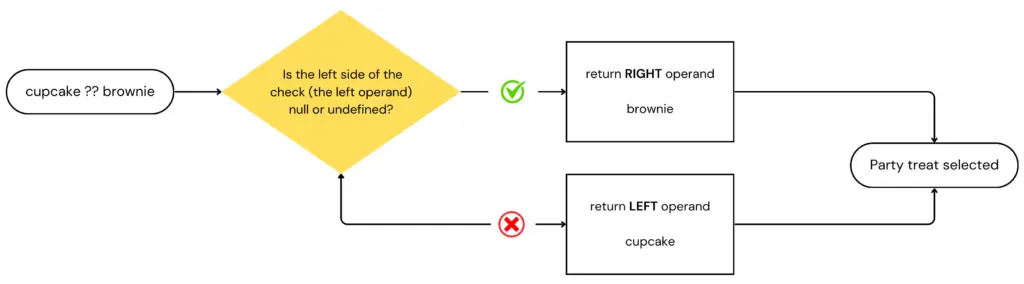
The operator ?? in this snippet returns the right-hand operand – brownie – when the left one – cupcake – is null or undefined.
For those of you who immediately jumped, shouting that this is the same as the logical OR operator ||, hang in there, I’ll get to you soon.
So, to make this crystal clear, let’s see the possible scenarios:
If the cupcake is null or undefined, then our partyTreat will be a brownie.
If the cupcake is anything other than null or undefined, then our partyTreat will be the cupcake. I just hope they actually bring a real cupcake, not a truthy version of it… 🥶 (A cold programmer’s joke 🤣).
Flowchart of the ?? operator: how JavaScript handles nullish values
Choosing the Right Operator: ?? or ||?
When it comes to handling default values in JavaScript, understanding the difference between the nullish coalescing operator (??) and the logical OR operator (||) is essential.
While both operators can provide fallback values, they behave differently with certain inputs.
The nullish coalescing operator returns the right-hand operand only if the left-hand operand is null or undefined, making it ideal for cases where you want to avoid falsy values like 0 or ''.
In contrast, the logical OR operator returns the right-hand operand for any falsy value, including 0, NaN, or an empty string.
By now, I am sure you understand that the nullish coalescing operator is a special case of a logical || operator, right?
So, they are different, but what would be a use case where one operator is preferable over the other?
Let’s assume we have a function that gets us a user’s score
In the first case, if the score is 0, which is falsy, then the finalScore ends up being assigned the default value of 100, even though 0 might be a legitimate score.
In the second case, that won’t happen. 0 is neither null or undefined, so the finalScore will end being 0, which is indeed a valid score.
Frequently Asked Questions
Can I combine the nullish coalescing operator with other operators in Javascript?
Yes, you can combine the Javascript nullish coalescing operator (??) with other operators to create more complex logic in your code. For example, by writing something like
we first evaluate if the user has entered a value (such as in a form). If userInput is null or undefined, we then evaluate whether the user is an admin.
If the user is an admin, result will be assigned the fallbackValue. If the user is not an admin, result will be false instead.
How can I chain multiple nullish coalescing operators together?
You can chain multiple nullish coalescing operators to evaluate different variables. For example, if you have several fallback options, the operator will return the first defined value it encounters:
Have you encountered any situations where one operator has significantly impacted your coding experience? If so, please share your examples in the comments below. We’d love to hear your insights!
Whether you are learning Javascript for the first time or you are an experienced developer, chances are you will be working with arrays frequently. This post was created to help you understand (or remind you of) how the most common Javascript array methods work. We recommend bookmarking this post, as it will be helpful more often than you might expect.
In addition to briefly explaining each method and providing relevant examples, we have also included the .length property since it’s also commonly used.
All Javascript array methods described in this post have been organized in alphabetical order to make searching easier. For those who want to learn more, we’ve also included a link to the MDN documentation in the footer of each code snippet for quick access to detailed information about the related method.
For any beginner developers who have just started their journey, seeing .prototype. in the name of every method might be confusing. I have to say, in my first steps, it confused me a lot, thinking, “Why not just say Array.every instead of Array.prototype.every” ? A quick and short explanation to help you move forward without getting stuck is that when we write Array.prototype.<method_name> it indicates that the method described exists natively within every array instance (within every array you use).
Array.prototype.every()
When to choose this: When you are checking if every element of an array passes a specific condition. Returns:true or false
array – the array itself, to which you have called .every
Array.prototype.filter()
When to choose this: The Javascript array filter method is probably one of the most used ones. Use it when you want to create a new array with elements that pass a specific condition. Returns:A new array, including the elements that passed the condition.
array – the array itself, to which you have called .filter
When a method returns a new array, it is not 100% independent from its source array. It’s a shallow copy! Proceed with extra caution on this because you might see some unexpected surprises!
Array.prototype.find()
When to choose this: When trying to find the first element in an array that passes a specific condition. Returns: The element that passes the condition or undefined if no element is found.
[🦊, 🐻, 🐼].find(element=>element === 🐼);// 🐼[🐼, 🐻, 🐼].find(element=>element === 🐼);// 🐼 (The first one)[🐻, 🐻, 🐻].find(element=>element === 🐼);// undefined
array – the array itself, to which you have called .find
Array.prototype.flat()
When to choose this: When you have complex array structures (arrays in arrays), and you want to flatten everything into one level. Returns: A new array containing all elements from different array levels.
When to choose this: When you want to create a new array where each element is transformed by applying a callback function to each element of the original array. Returns:A new array containing the transformed elements based on the callback function.
When to choose this: When you want to add an element (or more than one) to the end of your array. Returns:The new array’s length. The method modifies the original array by adding any passed element(s) to its end.
When to choose this: When you want to condense an array into a single value based on some logic applied by the callback function. E.g., when you want to calculate a sum or an average. Returns: A single value as a result of applying the callback function to each element of the array.
[1, 2, 1].reduce((acc, element) =>acc + element)// 4[1, 2, 1].reduce((acc, element) =>acc + element, 10)// 14 (accumulator - initial value - set to 10)
When to choose this: When you want to throw away the first item of the array. Returns: The item you threw, or undefined if the array was already empty.
When to choose this: When you want to replace some contents of an array or remove them. Returns:A new array is created by the removed/replaced elements.
[🦊, 🐻, 🐼, 🐸, 🐯, 🦝].splice();// [🦊, 🐻, 🐼, 🐸, 🐯, 🦝] - source array// [] - returns empty array[🦊, 🐻, 🐼, 🐸, 🐯, 🦝].splice(2);// [🦊, 🐻] - source array// [🐼, 🐸, 🐯, 🦝] - new array[🦊, 🐻, 🐼, 🐸, 🐯, 🦝].splice(2, 1);// [🦊, 🐻, 🐸, 🐯, 🦝] - source array// [] - returns empty array[🦊, 🐻, 🐼, 🐸, 🐯, 🐯].splice(2, 0, 🦝, 🦝);// [🦊, 🐻, 🐸, 🦝, 🦝, 🐯, 🐯] - source array// [] - new array/* New array was not created since we asked for 0 deletion. Instead the source array was modified. */
start: The starting point from which the removing/replacing begins. The start is included in the slice.
count: How many elements to delete. If omitted, it will be set from the starting position till the end of the array.
replacement: New element(s) to be added from the starting position
(Remember, the new array is a shallow copy of the source one).
Guidance on using Javascript array methods
You don’t have to memorize every Javascript array method, its syntax, and its exact functionality! It’s more important to know that they exist. Over time, you’ll naturally develop muscle memory for the ones you use frequently. For the less used methods, just keep them in mind and look them up when needed. Consider bookmarking this post for future reference! 🤓
In this post, we tried to explain/demonstrate some of the most common Javascript array methods. Our intention was not to provide comprehensive documentation, so we intentionally omitted more advanced parameters that are applicable to some of the methods described.
If you’re interested in learning about these less frequently used parameters, we recommend visiting the MDN Documentation linked in the footer of each code snippet.