Tag: Pull requests

Learn how pull requests work with practical guides, tips, and examples. From basic workflows to best practices, explore how to use pull requests for better collaboration in Git and GitHub.

  • How to Improve Pull Requests: 3 Basic Rules

    How to Improve Pull Requests: 3 Basic Rules

    In this post, I would like to share some thoughts that have helped me structure and enhance a pull request from the perspective of both the author and the reviewer. If you’re looking to create better pull requests, this post is for you.

    While writing this post, I am thinking mostly of GitHub, but I am sure that my thoughts apply, with a bit of modification maybe, to other platforms, too.

    So even if you are already the best on pull requests, maybe there is still room for improvement? 😅

    High five scene from the Anchorman movie
    Anchorman: The Legend of Ron Burgundy (2004)

    Just kidding, I am sure you are doing great and I know this post will ignite excitement among those with more basic and advanced skills.

    Screenshots for UI changes

    Whenever I’ve found myself working on frontend features, I’ve seen that it can be tough to understand UI modifications by just reviewing markup. An experienced developer might be able to catch any peculiar HTML/CSS code usage, but understanding exactly what’s changed on the UI requires supernatural abilities. 🦸

    (Have to say, it’s not a myth! I’ve met a developer with such skills! They truly exist out there!)

    So what can you do to help improve the process? One way to help your reviewers do a better job is by including screenshots of the UI changes you made through your pull request, rather than letting them review only the code differences.

    Think about it. Which one feels easier to understand? Seeing something like this:

    Or review it with a screenshot attached, like this:
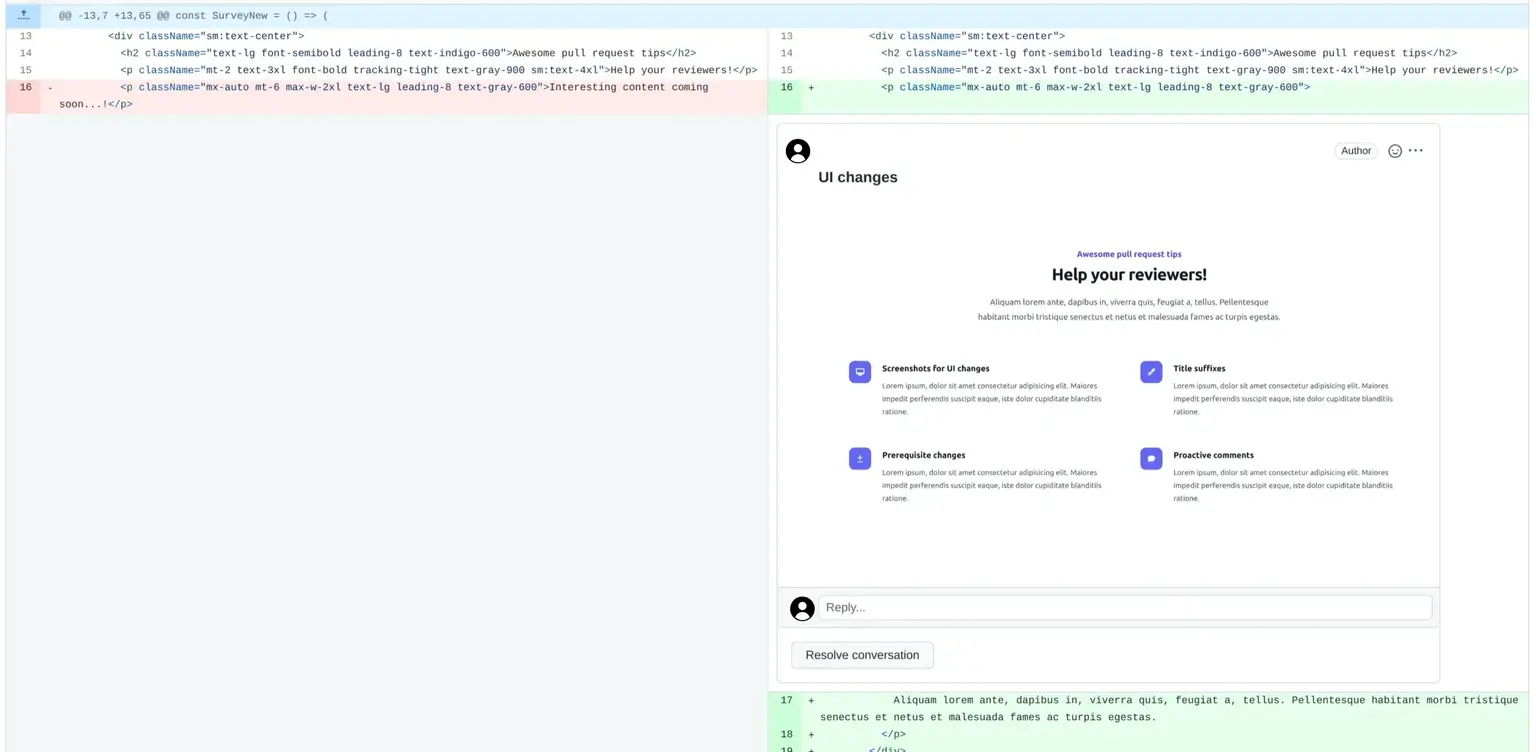
    By adding screenshots, you can give your colleagues a clearer understanding of what you’ve implemented and, at the same time, increase the chances of catching a bug before it gets deployed! 🐛

    Extra points 🧐

    • Attaching an image to show how the UI looked before your tweaks, could also improve the review process. Something like before – after.
    • Including mobile/tablet screenshots may also help in identifying a potential issue by seeing the UI changes for all devices, while QA testing.

    QA testing (Quality Assurance), is a process that amongst others, includes, checking if a code change (feature/bug) was implemented correctly. This is often done by a QA engineer/tester. Some QA testing also takes place by the actual developers, implementing a feature, before they send it for review.

    For minor UI changes adding screenshots is probably an overkill. I am sure your reviewers will be able to understand what’s changed without seeing an image. 😎

    Proactive comments for better pull requests

    Sometimes it can be difficult for me to understand if I have implemented something “correctly”. Especially when working on a large codebase, with many collaborators, it’s important to follow the agreed-upon coding guidelines.

    If you find yourself in a situation like this, don’t hesitate to ask for help by highlighting the pieces of code for which you don’t have much confidence. How? Simply by adding an emphasis comment. Just like adding a review comment in your own pull request, state your concerns so that your reviewers will pay extra attention, like this:
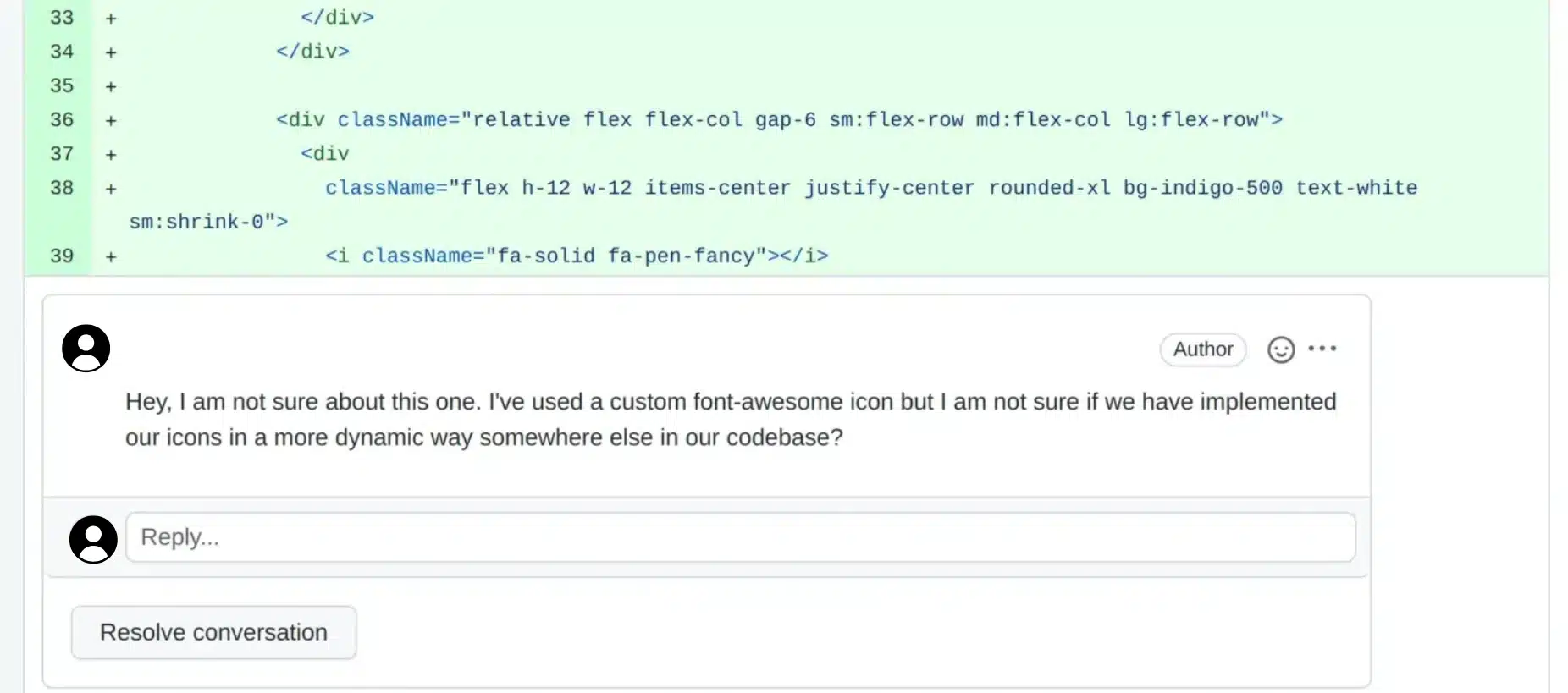
    As a result, your reviewer will conduct a more thorough review of the code modifications, and as a result, you’ll feel more confident about your pull request when it finally gets deployed.

    Improving the pull request title

    One of my favorite ways to improve a pull request is by adding suffixes to the titles. So, for example, let’s consider the following title:

    Better Github pull requests - nothing on title

    Although this is a nice pull request title, it still doesn’t provide answers, simply by checking the pr listing, to the following questions:

    • What’s the branch this pr is merged into?
    • What is the related issue?

    Let’s try and see how we can improve it, by changing its structure a bit. Our goal is to be able to extract more concise information simply by looking at the pr title.

    Adding the target branch

    It’s common for projects to have some basic branches, apart from the main one (old master). These branches are usually for QA testing or client demos, client playgrounds, etc.

    If you are working on a project like that, you might find yourself creating multiple requests per branch for various reasons. One pull request for QA testing, one pull request for the final deployment to the main branch, and so on.

    But if you do so, there is no way to identify the branch through the pr’s title, right? So what I prefer doing is just adding a simple suffix with the branch’s name. By doing so, if I have pull requests of the same feature to multiple branches it’s easier for me to understand what’s what.
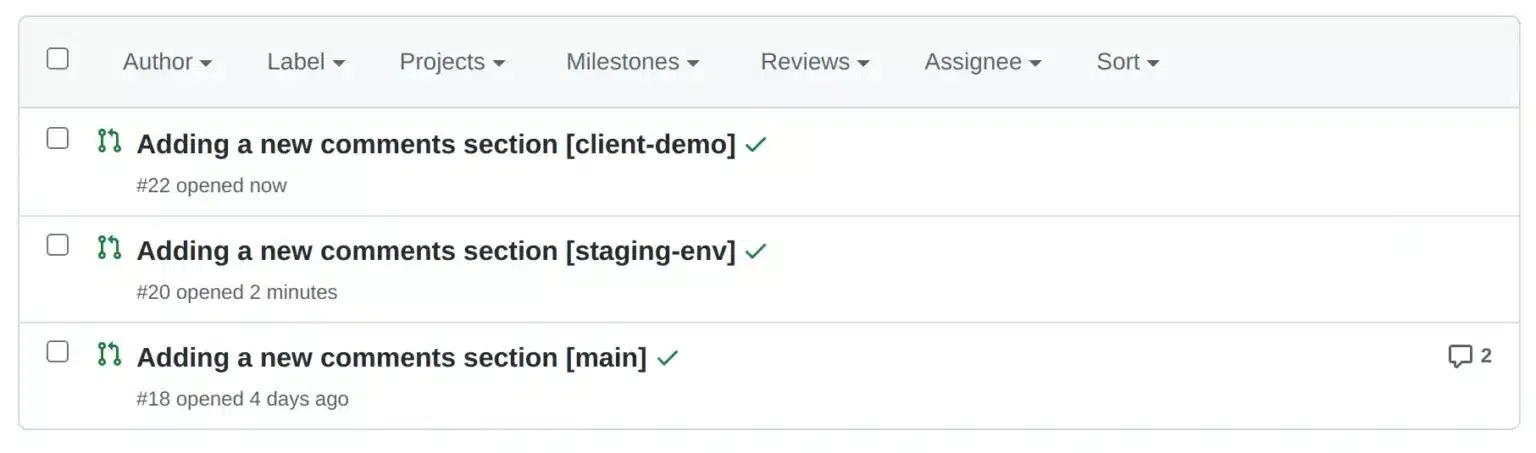
    Better Github pull requests - Branch on title

    Showing the related issue

    Another interesting suffix that works perfectly for GitHub (and I assume in a similar way for other platforms too) is adding the issue number in your pr title.

    (If you are using a workflow in which you create a GitHub issue before working on a new feature, then this is for you)

    Let’s assume you have created a GitHub issue with the number #312. After deploying your changes to the last branch, you might find yourself going through the GitHub Issues list and trying to find the respective issue so that you can close it. Right?

    Did you know there is a way to automatically close an issue when a pull request is merged? How? Well, it’s as simple as adding the Closes <Issue number> in the pull request’s title. So let’s say that for our pull requests, the Issue you have been working on is #312. If you change the last pull request title to something like:
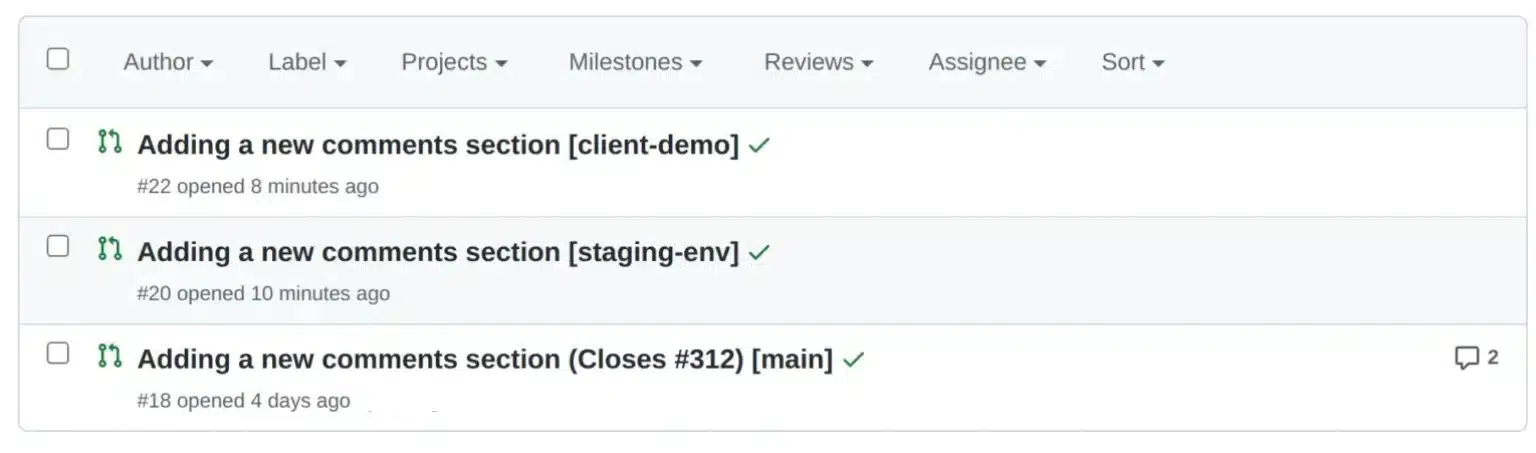
    Better Github pull requests - Branch and issue on title

    That means that when you merge the third pull request, issue 312, will also automatically close! Cool right?

    Likewise, other suffixes that may be used to connect an issue with a pull request are:

    • Fixes as in Fixes #312
    • Closes
    • Resolves

    Furthermore, there are several other resources available for you to explore in addition to the ones mentioned here; check the GitHub documentation for more.

    You may also want to check out our post on simplifying pull requests through prerequisite changes and helpful ways of splitting front VS back changes. This post explores how identifying and addressing necessary modifications before submitting your code for review can improve the code review process and increase your chances of success.

  • How to Improve Pull Requests: Prep & Split Strategies

    How to Improve Pull Requests: Prep & Split Strategies

    There will be times when you will be working on huge features (if you haven’t already 😎), some of which could take weeks and some even months. During your implementation, you will have to find a way to create better pull requests and try to write kickass code, all while figuring out how to make the review process better. After all, better reviews mean fewer bugs, right?

    In our previous post, we discussed some ideas for improving pull requests after a pull request has been created. However, sometimes, improving a pull request may require actions to be taken before our initial commit.

    So how can one create a better pull request before even committing their changes? The answer lies in carefully planning the steps of implementation before starting the actual implementation process. Whaaat? 🫨

    FX Networks series - Mind blown gif
    Source: Giphy

    Let’s decide on an example or a use case so that we can discuss our theory on common ground.

    A full-stack feature use case

    (This is a use case with simplified specs, used only as an example for this post, to ensure that we are both on the same page when discussing the topic at hand)

    To illustrate, let’s suppose we were asked to implement a new full-stack feature. In our example, we’ll assume that we want to add a new comments section to our blog.

    After having a design session with our team, the following specs were requested:

    Use case – Feature specs

    specs, short for specifications, outline the requirements a new feature implementation must meet to pass QA testing and be deployed.

    • In the existing post section, a new comments section will be added where readers can view and add comments related to the post.
    • Both the writer and the admin will be able to add, edit, and delete any type of comment.
    • A reader will also have the ability to add/edit/delete their own comments.
    • Show statistics for each post’s comments.

    Prerequisite changes

    It’s considered good practice to always take a step back and carefully consider the steps you should follow to implement a feature before diving headfirst. As the saying goes:

    Measure twice
    Cut once!

    But how does this relate to creating better pull requests?

    Well, in my opinion, when thinking about a feature’s implementation, the potential outcomes typically fall into the following categories:

    • Ways to achieve the desired outcome
    • Challenging code areas that may need refactoring beforehand
    • Necessary changes that are not directly related to the feature

    (This list is not that comprehensive! 😋)

    Both the last two items on the list are related to prerequisite changes that need to be made before the feature is successfully implemented. Some examples of these changes could be:

    • Introducing a new package dependency that needs to be used by your feature
    • Introducing some reusable components
    • Perform some code cleanup before introducing new code

    By identifying similar changes early on, you can significantly streamline your feature’s review process. Rather than creating one massive pull request that could make your colleagues’ lives challenging, you could create initial pull requests with independent changes, merge them, and continue with your feature implementation. In the follow

    Identifying our use case prerequisite changes

    While thinking about the feature’s implementation, I realized that it would be beneficial to introduce some distinct roles for our users, such as readers, writers, and admins. Additionally, since we have decided that we need statistics, I did some research and came across a fantastic statistics package to use for displaying how many comments a writer has over time.

    Although both changes are connected to our feature implementation, it’s worth considering the extent of their interdependence. Could we introduce these two changes and deploy them without completing our feature? The answer is yes! But how?

    These two changes, along with any necessary tests, could be included in different branches from which we would create pull requests and get them deployed.

    One branch will introduce user roles, and the other will contain the installation and configuration of the statistics package.

    These two branches can be referred to as prerequisite branches.

    Both pull requests will likely (depending on the codebase and implementation) not affect our existing codebase and can be reviewed and merged independently. As a result, we can continue working on our feature, without having our work blocked, at least not initially.

    Don’t get me wrong. Eventually, we will need our prerequisite changes. However, until that point, we will have found a way to continue our work and also start deploying pieces of code that do not impact our users or hinder our work.

    Splitting commits

    Now that we have reviewed and deployed our prerequisites, we need to focus on the actual feature. If you also like to work on full-stack features, you might find yourself following three paths while implementing a new change:

    • Starting from the backend.
    • Starting from the frontend.
    • Diving in both.

    Defining the best approach depends on your developer profile and the work needed. Each approach has many advantages but I’ve seen that shifting between approaches from time to time can transform and improve your mindset as a developer. So choose wisely and have fun!

    Meanwhile, if you decide to adopt the one-side-at-a-time approach then why not improve your pull request using the same method? How? By splitting your commits as you progress with your implementation.

    Splitting commits, for example, by backend and frontend ones, may also help if you are working with a team that doesn’t have full-stack engineers but separate teams of front and back-oriented developers.

    Splitting your work into smaller commits may also enhance your review process and lead to better pull requests. This is because individual commits also help reviewers concentrate on specific commit changes rather than the entire scope of your pull request.

    Applying split commits to our example

    To see that in action, let’s assume in our example that we will be following the implementation steps below:

    Backend implementation

    • Implement the comments CRUD logic.
    • Introduce role handlers needed for checking who can see what.
    • Add any unit/integration tests.

    Frontend implementation

    • Create our new UI views and any additional components.
    • Add the necessary routes.
    • Add any unit/integration tests.

    By creating two separate pull requests or one pull request with different commits, each containing the respective changes (backend & frontend), we can greatly improve the efficiency and effectiveness of the review process.

    I get it. Sometimes, this may seem like overkill, but trust me, breaking work into smaller pieces, will unlock new paths in your thinking process which will boost your problem-solving skills in multiple ways.

    In general, developers often neglect managing pull requests as we tend to believe that our work ends when pushing that final commit. I can assure you, though, that giving more emphasis on the other aspects of your workflow, as we’ve talked about in this post, can have a significant impact on your work.