Tag: testing

  • Javascript Testing Tools Explained: What Beginners Really Need To Know

    If you just learned what testing is and you’re still a bit unsure how to start, you’re not alone. Many beginner developers feel overwhelmed by the amount of tools and libraries in the Javascript testing world. You might wonder: do I need Jest? What is Vitest? Why does everyone keep talking about mocking things?

    Let me help you make sense of it all.

    This post builds on the one you (hopefully) already read: Javascript testing for beginners: A simple, practical introduction. If not, it’s a good starting point to understand why testing matters in the first place. Here, we’ll talk about what tools are out there, why they exist, and how to choose the right one for your project.

    Why so many testing tools?

    The short answer is: because testing needs can be very different. Some developers need to test just one small function. Others need to simulate how a user clicks buttons on a real webpage. Some need to test backend logic or APIs. And some want all of that together.

    Different tools are created to solve different testing problems. Let’s look at the main ones you’ll hear about.

    What is a testing framework?

    Before going further, let’s clear something up. When people say “testing framework” or “testing library,” they sometimes mix up terms. In this post, we’ll use them loosely. Don’t worry too much about definitions.

    But just so we’re on the same page:

    • A testing framework usually provides the structure: how to describe a test, run it, and report results.
    • A testing library might focus on one specific part of the testing process (like simulating user actions or helping with mocking).

    Now let’s see what each popular tool actually does.

    Jest: The default for many projects

    Jest is probably the first tool you’ll hear about in Javascript testing. It’s widely used, especially in React projects. And for good reason—it comes with most things you need built in: test runner, assertion library, and mocking tools.

    • You can write simple tests using test() and expect().
    • You can mock functions easily (see what a mock is if you’re unsure).
    • It works out of the box with many setups.

    A basic test in Jest looks like this:

    import { sum } from './math';
    
    test('adds two numbers', () => {
      expect(sum(2, 3)).toBe(5);
    });
    JavaScript

    Jest is great for unit tests, which are explained more deeply in Integration and unit tests: How to choose the right one?. But it also supports more advanced setups.

    Still, Jest isn’t perfect for every case.

    Vitest: Fast and Vite-Friendly

    If you’re using Vite, you might prefer Vitest. It’s a newer test runner that works very similarly to Jest but is built for speed and modern dev setups.

    It supports:

    • ES modules by default
    • Fast startup thanks to Vite integration
    • Very similar API to Jest, so switching isn’t too hard

    If you’re just starting and you already use Vite for your project, Vitest is a great alternative. It feels lighter and quicker, especially for frontend apps.

    Testing Library (RTL): For testing UI like a real user

    React Testing Library (often called RTL) is a library for testing user interfaces. It doesn’t replace Jest—it works with Jest.

    RTL helps you simulate how users actually interact with your app:

    • Clicking buttons
    • Typing in inputs
    • Checking if the right text shows up

    Instead of testing if a certain component method was called, you test what the user sees. This makes your tests more realistic.

    It follows a rule: “The more your tests resemble the way your software is used, the more confidence they can give you.”

    Mocha, Chai, Sinon: The Classic Trio

    Before Jest became popular, many Javascript projects used this combo:

    • Mocha for running tests
    • Chai for writing assertions
    • Sinon for creating mocks and spies

    These tools are still good and used in some backend or legacy projects. They give you more flexibility, but also more setup.

    For example, to run tests with Mocha and Chai, you’ll usually need to install them separately and configure them more manually.

    If you’re just starting, you don’t need to go this route unless you’re joining a project that already uses them.

    What about Mocks, Spies, and Stubs?

    You’ll hear these words a lot when testing. Here’s what they mean in simple terms:

    • A mock is a fake function that replaces a real one during testing. It lets you test what happens without calling the real thing.
    • A spy is a function that records if and how it was called, but still lets the real function run.
    • A stub is like a mock but with more control—you can decide what it returns.

    If you’re confused, check the glossary entries for mock and spy.

    These tools are helpful in unit testing, when you want to isolate just one part of your code. For example, you might want to check that a function called another one, but without actually doing what the second one does.

    What should you use as a beginner?

    Here’s a simple suggestion:

    • Start with Jest. It’s well-documented, easy to set up, and covers most use cases.
    • If you’re using Vite, try Vitest instead.
    • If you’re building user interfaces, add Testing Library to test what the user sees.

    You don’t need everything at once. Focus on learning how to write a few tests. You’ll naturally learn the tools better as you write more code.

    A quick example: Putting it together

    Let’s say you have a small function like this:

    export function greetUser(name) {
      return `Hello, ${name}!`;
    }
    JavaScript

    A simple unit test using Vitest would be:

    import { describe, it, expect } from 'vitest';
    import { greetUser } from './greet';
    
    describe('greetUser', () => {
      it('greets by name', () => {
        expect(greetUser('Anna')).toBe('Hello, Anna!');
      });
    });
    JavaScript

    You could use Jest instead—the code would almost be the same. This test checks the return value, no mocking needed.

    Later, if your function becomes more complex (calls an API, uses another function), you might use a mock to isolate the behavior. You can then write more detailed tests, like we discuss in Integration and unit tests: How to choose the right one?.

    Final thoughts

    Don’t feel like you need to master every testing tool at once. Testing is a skill you build slowly. Start small, use a simple tool like Jest or Vitest, and practice writing real tests.

    If you’re ever stuck on what kind of test to write, go back to Javascript testing for beginners and Integration and unit tests: How to choose the right one? to refresh the theory.

    The tools are just tools—they’re here to help you write better, safer code. And soon, you’ll start to feel that they do.  🥳

  • Javascript Testing for Beginners: A Simple, Practical Introduction

    Learning Javascript often feels clear at the beginning. You write some code, refresh the browser, and see something working on the screen. That feedback is immediate and encouraging. But as soon as your code grows beyond a few files or functions, things start to feel less predictable.

    You change a small piece of logic, and something unrelated breaks. You fix that, and another issue appears somewhere else. At that point, many beginners feel stuck. They know something is wrong, but they don’t have a reliable way to understand what changed or why.

    This is where testing becomes useful.

    Javascript testing is not about writing perfect code or preventing every bug. Especially for beginners, testing is about building confidence and clarity. It gives you a way to check that your code behaves the way you think it does, and it gives you fast feedback when that behavior changes.

    This guide introduces Javascript testing in a practical, beginner-friendly way. It focuses on understanding the ideas first, without pushing tools or complexity before they make sense.

    What is Javascript testing?

    Javascript testing is the practice of writing code that checks other code.

    A test runs part of your Javascript program and verifies that the result matches what you expect. If the result is correct, the test passes. If it’s not, the test fails and shows you that something is wrong.

    Most tests are built around veassery simple expectations. You might expect a function to return a specific value, handle invalid input gracefully, or behave consistently when called multiple times. Testing gives you a repeatable way to verify those expectations instead of relying on manual checks.

    Testing is part of a broader idea known as software testing, which exists across all programming languages. Javascript testing applies the same principles to Javascript code, whether it runs in the browser, on a server, or inside a larger application.

    The key benefit of testing is not automation alone. It’s trust. When you have tests, you don’t have to wonder whether something still works. You can check.

    Why Javascript testing matters for beginners

    Many beginners believe testing is something you add later, once you are “good enough” at Javascript. In reality, testing is often most helpful when you are still learning.

    When you write tests, you are forced to be precise about what your code should do. That process often exposes misunderstandings early. A test might fail not because your code is broken, but because your assumption about how something works was incorrect.

    Without tests, debugging tends to rely on trial and error. You log values, refresh the page, and hope you notice what went wrong. With tests, failures give you direct signals. They tell you that something changed and help narrow down where the problem lives.

    Testing also makes change safer. Beginners often avoid refactoring because they’re afraid of breaking something they already fixed. Tests reduce that fear by giving you quick feedback when behavior changes.

    How Javascript testing works at a basic level

    At a basic level, Javascript testing follows a simple pattern.

    You provide some input, run the code you want to test, and then check the result. That final check is done using something called an assertion. An assertion compares what actually happened with what you expected to happen and decides whether the test should pass or fail.

    To make this more concrete, here’s a very small example using Jest.

    Imagine you have a simple function that adds two numbers:

    export const add = (a, b) => {
      return a + b;
    };
    JavaScript

    Now you want to test that this function works as expected. A basic Jest test might look like this:

    import { add } from './add';
    
    test('adds two numbers correctly', () => {
      expect(add(2, 3)).toBe(5);
    });
    JavaScript

    In this example:

    • test defines a test case
    • add(2, 3) runs the code being tested
    • expect(add(2, 3)).toBe(5) is the assertion

    The assertion checks whether the actual result matches the expected result. If add(2, 3) returns 5, the test passes. If it returns anything else, the test fails.

    You don’t need to understand every detail of the syntax right away. What matters is the idea: tests describe expected behavior and automatically verify it.

    Types of Javascript testing you should be aware of

    Javascript testing includes different approaches, but beginners don’t need to use all of them immediately.

    The most common starting point is unit testing. Unit tests focus on small, isolated pieces of code, usually individual functions. They are fast to run, easy to understand, and easier to debug when something goes wrong.

    Other testing types exist, such as integration testing and end-to-end testing. These focus on how different parts of an application work together or how the entire application behaves from a user’s perspective.

    One common question beginners ask is whether to focus on unit tests or integration tests first, and how to choose between them.

    As a beginner, it’s enough to understand that these testing types exist and serve different purposes. You can explore them gradually as your projects grow in size and complexity.

    Javascript testing tools and why they exist

    To run tests, you need a testing tool. A Javascript testing tool provides a way to execute your tests, make assertions, and show clear feedback when something fails.

    At a basic level, testing tools take care of the repetitive work. They find your test files, run them, and report which tests passed or failed. This lets you focus on writing and understanding tests instead of building your own testing system from scratch.

    Different tools exist because they solve slightly different problems.

    Some tools, like Jest and Vitest, are all-in-one solutions. They include a test runner, an assertion system, and helpful features like watching for file changes. These tools are often a good starting point for beginners because everything works together out of the box.

    Other tools focus on specific parts of the testing process. For example, Chai is an assertion library that helps you express expectations clearly, while Sinon is commonly used for creating mocks and spies when you need more control over how code behaves during tests.

    In frontend-focused projects, especially those using frameworks like React, you may also encounter React Testing Library (RTL). Its goal is to help you test components in a way that reflects how real users interact with them, rather than testing internal implementation details.

    It’s important to understand that you don’t need all of these tools at once. Many beginners start with a single, integrated tool and add others only when a specific need appears. The concepts behind testing matter far more than the number of libraries you use.

    Testing tools exist to support learning and confidence. They should make testing feel easier, not heavier.

    Not sure what tool to start with? I broke down the main ones like Jest and Vitest in a separate post: Javascript Testing Tools Explained, so you can pick without the overwhelm.

    How testing changes the way you write Javascript

    Over time, testing influences how you approach writing code.

    When you write tests, you naturally start thinking in terms of inputs and outputs. You tend to write smaller, clearer functions because they are easier to test. This leads to code that is easier to read, reason about, and maintain.

    Tests also act as a form of documentation. They show how your code is expected to behave in real situations, which is helpful when you return to a project later or share it with others.

    Some developers take this further by writing tests before writing code, a practice often called test-driven development. You don’t need to follow this approach strictly, but understanding it helps put testing into a professional context.

    Common beginner worries about testing

    It’s normal to feel unsure when starting with testing. Many beginners worry about writing tests the wrong way or not testing enough.

    The truth is that imperfect tests are still useful. Testing is a skill that improves with repetition. Early tests may feel awkward, but they still provide feedback and build understanding.

    Avoiding testing because it feels unfamiliar only delays that learning. Progress matters more than getting everything right.

    Final thoughts

    You don’t need a large project to begin testing. One function is enough.

    Write a test. Let it fail. Fix the code. Run the test again and see it pass. That small loop is where learning happens.

    As you gain experience, you can add more tests, improve structure, and adopt better practices. But the foundation remains the same: define expected behavior and verify it automatically.

    Javascript testing is not about rigid rules or unnecessary complexity. It’s about clarity, confidence, and understanding how your code behaves over time.

    For beginners, testing provides structure in a learning process that can otherwise feel chaotic. It helps you move from guessing to knowing, and from hesitation to confidence.

    This post is meant to be a foundation. You don’t need to master everything at once. Testing will grow with you, quietly supporting your progress as your skills develop.

  • Integration and Unit Tests: How to Choose the Right One?

    Integration and Unit Tests: How to Choose the Right One?

    If you are making your first steps in code testing, I want to start by congratulating you on walking that path! 🥳 This is a crucial decision and a great addition to your skill set. Before writing some tests, it’s vital to grasp the difference between two fundamental testing methods regarding integration and unit tests. In this post, we’ll dive into these testing types and explore their differences.

    If you’re new to testing in general and want a broader overview before comparing testing types, this introduction to Javascript testing for beginners explains the core ideas in simple terms.

    Testing scenario for our comparison

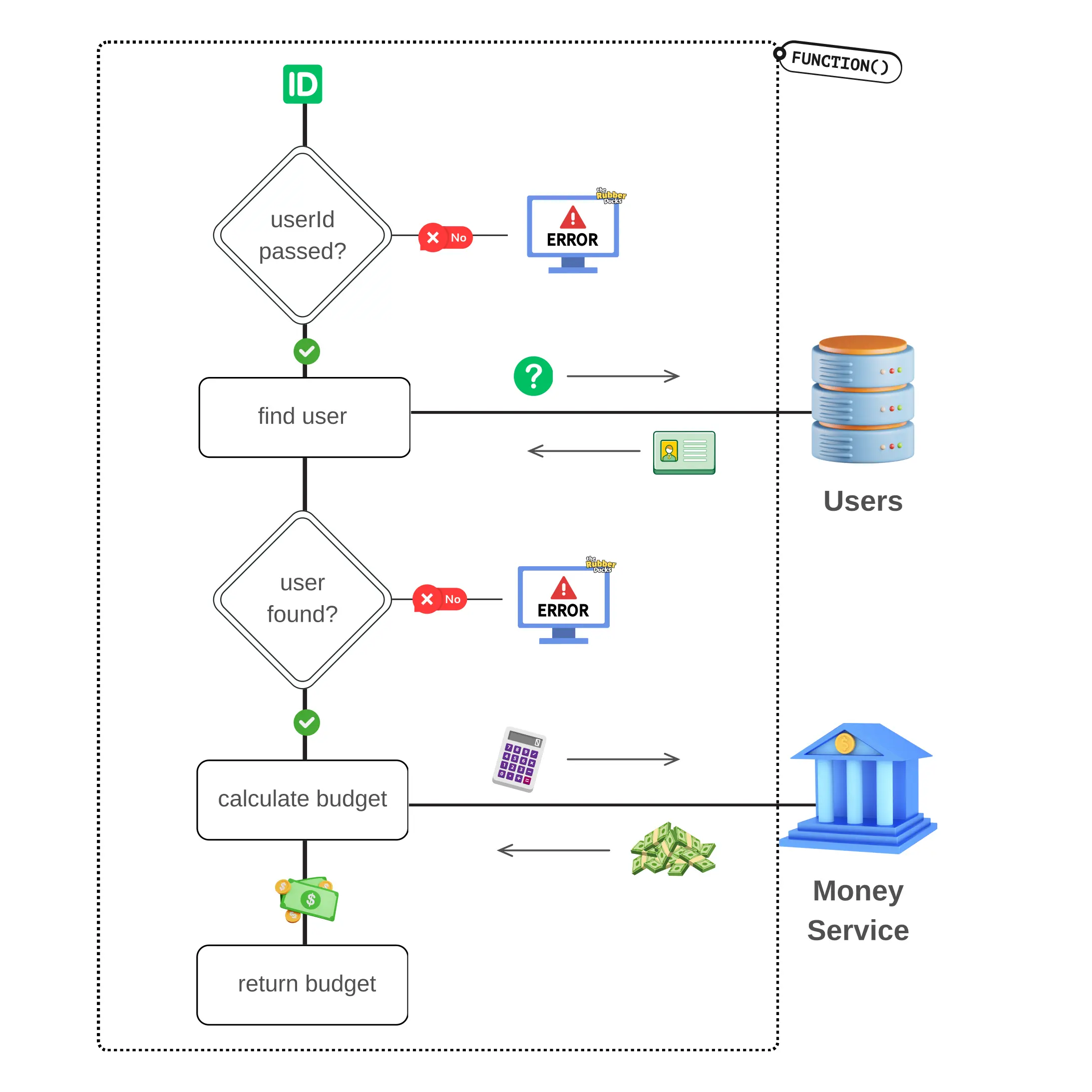
    To understand the difference between integration and unit tests, let’s use an example of a function that calculates a user’s daily budget. We’ll name our function determineUserBudget and have the following flow:

    • Takes a userId parameter to perform a search for a user.
    • Uses the provided  userId to search for the corresponding user in the Users table of our database.
    • If we call the function without passing a userId, it will throw an Error to indicate the missing parameter.
    • Furthermore, if no user is found, it will also throw an Error to signify the absence of a matching user.
    • However, if a user is found, it will use the user’s info and call our Budget service.
    • Subsequently, it will perform budget calculations based on the retrieved data.
    • Lastly, the function will return the budget as its final output.

    Let’s see what was just described through the following diagram so that it is easier to understand the function flow:

    To differentiate between the internal workings of the function and the external connections that need to be made, I am using a dotted border.

    Now that we have our testing scenario, let’s see what’s the difference between these two types of testing, and how we would test our function in each method.

    (We won’t be writing any code in this post).

    What is a unit test?

    When writing a unit test we want to isolate the part of the code we are testing from the rest of the system.

    This Is The Main Characteristic Of Unit Tests, Isolation!

    Consider it as if you are focusing all your energy only on what’s happening inside a function without any regard for the function’s calls/interactions with the database, services, or any other invoked functions.

    In our scenario, to unit test determineUserBudget , we’ll ignore the call to our database and the call to the money service. Our focus will solely be on testing if all potential function flows (see green arrows) are followed as expected.

    So, for the unit testing methodology, here are some testing scenarios we could write regardless of the testing suite, to ensure comprehensive coverage of your function:

    • it should throw an error if no userId is passed.
    • it should make a call to the database if the correct userId is passed.
    • it should throw an error if no user is found.
    • it should contact the Money service if a user is found.
    • it should return the calculated user’s budget

    However, what about the two calls in the database and service? How can we isolate our function from these calls?

    When writing unit tests we need to substitute the external calls with mock functions so that we can simulate the call without actually making it.

    A mock function is a function that replaces the behavior of an actual function during the testing.

    To create an effective mock function, it’s essential to understand the response type and structure of the function being replaced. Understanding the response type and structure allows us to mimic the behavior of the original function and ensure that the mocked function provides the expected data during our testing.

    After replacing the external calls with mocked ones we can safely focus on testing the function without any interactions with the external environment. This isolation allows us to concentrate on the internal workings of the function and successfully unit test it.

    What is an integration test?

    In contrast with unit tests, the keyword on integration tests is not isolation but interaction. Through integration tests, we are testing how different parts of our code interact with each other.

    The Key Word On Integration Tests Is Interaction!

    In our testing scenario, we will test much more! We will test our function’s results, including the interaction with the database and the correctness of the budget returned. The difference with the unit test is that we will pass “real” data and receive back “real” data to test.

    In the integration testing methodology, the following testing scenarios could be some examples you could use based on our use case:

    • it should return X budget when a user is approved.
    • it should return Y budget when user is new.
    • it should follow Z budget calculation methodology when user is pending confirmation.
    • it should calculate the budget correctly for a user with a positive income and no expenses.

    As you can see, the nature of our tests changed; we shifted our focus from testing the internal flow, to verifying our function produces the desired results, data, and budget.

    Writing integration tests can be challenging because they require proper data preparation before executing the actual test. It’s quite common to spend more time during the initial steps to understand the required data and set up the necessary test environment before successfully executing the test.

    Trusting external package providers

    See that I didn’t mention testing the connection with the service? Well even if these are integration tests, they still don’t test connections with external services/providers.

    Through integration tests, we are testing the way our functions interact with each other, not how they interact with external service functions. These functions are expected to have been tested by the service provider.

    So, if for example you like using lodash and have used isEmpty in your function, you should not write unit tests about lodash isEmpty. It should be taken for granted that isEmpty is a black box for you that has been thoroughly tested by lodash’s developers.

    Caution when using real data

    It’s important to note that when I mention using real data, I am not referring to the same data used on the production site. Using production data in testing can lead to serious issues, like GDPR compliance and the leak of sensitive data.

    Instead, by “real” data, I mean realistic/similar data, that the testing suite will use based on the testing environment. For example, when testing locally, the test would use data from the local database. When testing on a staging environment, the test would use data from the staging database.

    A staging environment is an environment we use for testing features and bug fixes before deploying them on production. A safe simulation of a site or software used in production.

    You should anticipate that these databases will be populated with data that is structured similarly to your production database, but not identical.

    Which testing method to choose?

    While there isn’t a definitive answer to this question if I had to answer that, I’d say, “It depends.” And yes I know you probably don’t like that answer. In that case, if I had to choose one answer, I would say that you always need to choose both types.

    Unit tests are awesome for checking function flows, but integration tests are the best so that you may have a good night’s sleep! 😴 What I usually do is follow an approach that combines both. For complex functions, I write at least one integration test and multiple unit tests for each individual function the complex function relies on.

    I consider writing tests a form of art, and while it may take time to master, incorporating it into your workflow will bring immense value. Once it becomes an integral part of your everyday workflow, you’ll experience a remarkable mind-shift that will not only enhance your testing skills but will also change the way you implement a feature. You’ll begin wearing two hats, the developer and the tester. By doing so, you’ll be able to proactively think about edge cases, error conditions, and much more while implementing your features!

    I can assure you it’s a mind-blowing and life-changing process. So what are you waiting for? Go for it!!